Confidential Business Reports Leaked to Competitors: How to Protect Market Research and Stop PDF Piracy
Protect your business reports and market research from leaks and unauthorized sharing with DRM technology that prevents piracy and revenue loss.
Last month, I faced a nightmare scenario many business managers dread: a strategic market research report I shared with a potential partner ended up in the hands of our competitor. The result? We lost a major deal, and our reputation took a hit. It was a tangible example of how uncontrolled document sharing can directly affect revenue and client trust. After that experience, I realized that even with NDAs in place, digital documents like PDFs are vulnerable without proper protection.
Many businesses underestimate how easy it is for confidential reports to be copied, forwarded, or converted into editable formats. In my case, someone had simply shared the PDF beyond the intended recipient. Within days, our proprietary research and client-specific strategies were being used by a competitor. This isn’t just a hypothetical riskit’s a visible business loss that can affect contracts, negotiations, and competitive advantage.
One of the biggest pain points is the leakage of market research or strategy documents. These files are often packed with sensitive data, insights, and projections that define a company’s competitive edge. When such content is shared outside the intended circle, the consequences are measurable: lost revenue, weakened client trust, and diminished intellectual property value.
Another common problem is unauthorized copying, printing, or conversion. Even if a document isn’t emailed outside the organization, employees or external partners can copy content into Word, Excel, or image formats, then distribute it without oversight. The financial impact may not be immediate, but over time, this leads to lost opportunities, IP theft, and reputational damage.
Finally, businesses frequently struggle with a loss of control over sensitive data. Once a PDF is out of your hands, there’s no easy way to revoke access, track usage, or prevent misuse. This exposes companies to competitive risks and reduces their ability to enforce confidentiality agreements effectively.
This is where VeryPDF DRM Protector becomes a game-changer. It provides a practical, scenario-driven solution that addresses these exact business pain points. With DRM Protector, you can restrict PDF access to authorized users only, preventing forwarding, printing, copying, or conversion into other formats. I’ve personally seen how this technology stops potential leaks before they happen, giving teams peace of mind while keeping sensitive business reports secure.
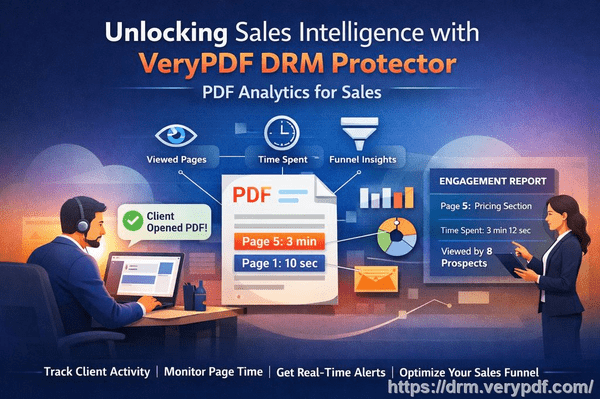
For example, I recently used VeryPDF DRM Protector to distribute a client-facing market research report. Instead of sending a standard PDF, we protected it with DRM controls. Only the intended recipients could open the file, and printing or copying was disabled. This not only prevented unauthorized sharing but also made tracking access simple. We could see exactly who opened the report and when, providing accountability and reducing risk.
The anti-piracy benefits are particularly impressive. By preventing PDFs from being converted to Word, Excel, or images, the tool stops others from repurposing or selling proprietary content. In one scenario, a competitor attempted to bypass PDF restrictions, but the DRM controls prevented any unauthorized use. This saved our company potential revenue loss and maintained our competitive advantage.
Implementing VeryPDF DRM Protector is straightforward. Here’s how it works in practice:
-
Restrict access: Assign files to specific users, teams, or departments. Unauthorized users are blocked automatically.
-
Prevent copying, printing, and forwarding: Lock down content to ensure that even legitimate recipients cannot misuse it.
-
Track document usage: Monitor who accessed the file, when, and how often, providing transparency and accountability.
-
Protect market research and proprietary reports: From strategy documents to sensitive business proposals, DRM Protector keeps critical information secure in real operational contexts.
Real-life examples reinforce its value. One company I consulted for shared quarterly business insights with partners through DRM-protected PDFs. Before implementing DRM, they suffered repeated leaks, costing them several clients. After using VeryPDF DRM Protector, leaks stopped completely. Not only did this prevent financial losses, but it also restored trust with partners and internal teams.
For business managers and content creators, the solution is both practical and cost-effective. Implementing DRM protection doesn’t require extensive technical knowledge, and it integrates seamlessly with existing workflows. The immediate effect is visible: sensitive content remains controlled, risk exposure decreases, and businesses retain full ownership of their intellectual property.
Here’s a simple step-by-step guide to protecting your PDFs effectively:
-
Upload your confidential PDF to VeryPDF DRM Protector.
-
Set user permissions and access limits for teams, clients, or departments.
-
Disable printing, copying, and conversion to other formats.
-
Distribute the secured PDF with confidence, knowing only authorized users can open it.
-
Monitor access logs to track usage and ensure compliance.
In my experience, the ROI is immediate. By preventing even a single leak, the tool can save thousands in lost contracts, protect market share, and safeguard proprietary insights. It’s a small investment for a massive reduction in risk.
I highly recommend VeryPDF DRM Protector to anyone distributing confidential business documents who wants to avoid costly leaks. It has given me peace of mind knowing our sensitive reports are secure, while simplifying the management of access and compliance.
Try it now and protect your business reports: https://drm.verypdf.com
Start your free trial today and keep your market research secure from leaks or misuse.
Frequently Asked Questions
Q: How can I limit access to confidential business documents to prevent revenue loss?
A: VeryPDF DRM Protector allows you to restrict PDFs to specific users, teams, or departments, ensuring only authorized individuals can access sensitive content.
Q: Can I stop others from copying, printing, or converting my reports into editable formats?
A: Yes. DRM Protector disables printing, copying, and conversion to Word, Excel, or images, preventing unauthorized use or distribution.
Q: How do I track who accessed my business reports and when?
A: The tool provides detailed logs showing who opened a PDF, when, and how often, giving complete accountability for sensitive documents.
Q: Does DRM technology prevent unauthorized sharing of PDFs outside my organization?
A: Absolutely. DRM controls prevent forwarding or sharing with non-authorized users, keeping confidential data contained within approved channels.
Q: How easy is it to securely distribute protected business reports to clients or colleagues without risk?
A: Very easy. You simply set access permissions and share the DRM-protected PDF. Recipients can view content without compromising security, while unauthorized access is blocked.
Q: Can I protect different types of business documents, like strategy plans and market research?
A: Yes. DRM Protector works with all types of sensitive PDFs, including proposals, research reports, financial analyses, and proprietary strategy documents.
Q: Will implementing DRM disrupt our existing workflow?
A: No. VeryPDF DRM Protector integrates seamlessly with your current processes, making it simple to secure documents without adding complexity.
Tags/Keywords
protect business reports, secure market research, prevent PDF piracy, stop unauthorized access, protect confidential PDFs, prevent PDF conversion, secure proprietary documents, protect business data, prevent leaks, control PDF distribution