Securely Redact Sensitive PDFs: Prevent Data Leaks and Protect Confidential Information
Last month, our legal team sent a PDF contract to a partner, only to discover afterward that it still contained unredacted client names and financial details. A simple oversight like this could have triggered a GDPR violationand potentially serious fines. It made me realise how easy it is for sensitive data to slip through the cracks, even when you think your redaction process is solid.
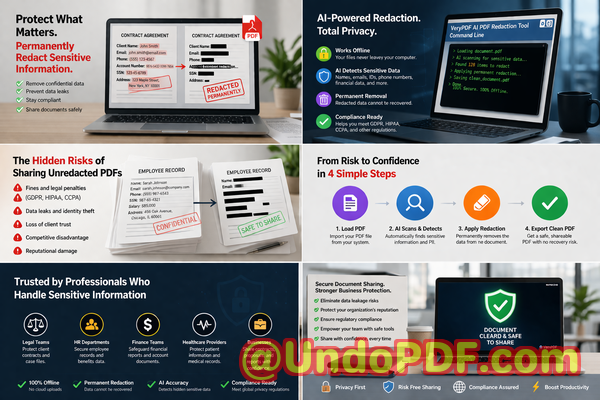
In today’s fast-paced business environment, sharing documents is unavoidable. Contracts, financial reports, HR records, and internal policies all need to circulatebut each carries sensitive information that, if leaked, can create legal, financial, and reputational damage. Many businesses rely on manual redaction or online tools, assuming the data is safe. Unfortunately, blacking out text in a PDF doesn’t always remove the underlying information, and uploading files to online services introduces another layer of risk.
I’ve seen companies face real consequences: confidential employee details accidentally exposed to external vendors, sensitive financial reports sent to the wrong clients, and intellectual property visible to competitors. That’s why securing documents with AI-powered redaction that permanently removes sensitive information has become a non-negotiable necessity.
Sensitive data leaks happen more often than you might think. Here are a few scenarios I’ve witnessed firsthand:
-
A finance department sent quarterly reports to external auditors, only to find that Social Security numbers and employee salaries were still extractable from the PDFs. The embarrassment and risk to employee privacy could have been catastrophic.
-
A law firm used a “blackout” redaction tool for case files, assuming that blocked text was gone. Months later, a savvy recipient recovered the underlying information, putting client confidentiality at risk.
-
HR teams often resort to free online PDF editors to remove personal employee data. Unbeknownst to them, these documents were uploaded to third-party serverspotentially exposing sensitive information to unknown parties.
Manual redaction or relying on online services is no longer enough. This is where VeryPDF AI PDF Redaction Tool Command Line shines. By combining AI-driven detection with secure local processing, it solves real, visible business problems without compromising privacy.
Imagine this workflow: you load your PDF, the AI scans for sensitive datalike names, email addresses, phone numbers, financial records, IDs, and other confidential information. You review the results, apply redaction, and export a clean, permanently redacted PDF. It’s that simple. No sensitive data remains hidden behind black boxesit’s gone for good.
What makes it especially powerful for businesses is its offline processing. Your confidential files never leave your computer. There’s no risk of exposing sensitive client data to a cloud server or a third-party service. You maintain full control, ensuring compliance with regulations like GDPR, HIPAA, or any internal privacy policy.
I’ve seen how using this tool prevents costly mistakes. For example, a mid-sized consultancy needed to send financial reports to investors. Using traditional redaction, one document mistakenly retained client names in metadata. Switching to VeryPDF’s AI redaction tool, every file was thoroughly cleansed before sharing, avoiding any legal exposure or loss of trust. Another company moved HR records from an online editor to this offline solution and immediately reduced risksensitive employee data was no longer at the mercy of external servers.
To give a clearer picture, here’s what a typical redaction process looks like with VeryPDF:
-
Load the PDF into the tool.
-
AI scans and identifies sensitive data:
-
Personal identifiable information (PII) like names, addresses, IDs
-
Financial records including bank account numbers and salaries
-
Proprietary business information or trade secrets
-
Legal clauses or confidential contract terms
-
-
Review detected items and confirm redactions.
-
Apply redaction permanently.
-
Export a clean, secure PDF ready for safe sharing.
This process doesn’t just prevent accidental data leaksit protects your company from legal liabilities, fines, and reputational damage. Employees no longer need to guess what’s safe to share, and managers can confidently circulate documents knowing that sensitive information is fully removed.
I highly recommend implementing an AI-powered, offline PDF redaction tool in any business where confidentiality matters. Whether you’re in finance, legal, HR, or operations, the benefits are tangible:
-
You eliminate the risk of exposing sensitive data to third parties.
-
Compliance becomes simplerevery shared PDF meets privacy regulations.
-
Productivity improves by removing the need for painstaking manual redaction.
-
Peace of mind knowing that all confidential information is permanently removed.
In real terms, it’s about avoiding scenarios like:
-
Accidentally sending employee Social Security numbers to external auditors.
-
Sharing contracts with clients that still contain competitor-sensitive clauses.
-
Exposing financial records to vendors due to incomplete redaction.
By securing your PDFs with AI-powered redaction, you control exactly what leaves your organizationand what doesn’t.
Frequently Asked Questions
-
How can I permanently remove sensitive data from a PDF instead of just hiding it?
The VeryPDF AI PDF Redaction Tool Command Line fully deletes sensitive content, ensuring it cannot be recovered or copied from the document.
-
Can others recover redacted information from my PDF?
No. Unlike visual blackouts, AI redaction removes the underlying data completely.
-
Is it safe to use online PDF redaction tools?
Online tools can pose risks because your files are uploaded to external servers. Confidential information could be exposed or stored without your knowledge.
-
Does this tool work completely offline?
Yes. All processing happens locally on your computer, giving you 100% control over sensitive information.
-
What types of sensitive data can be automatically detected and removed?
Personal identifiers (names, addresses, IDs), financial information, business secrets, confidential legal clauses, emails, and phone numbers.
-
Can this tool help with GDPR compliance?
Absolutely. By permanently removing sensitive personal data before sharing, you minimize risk of regulatory violations.
-
Is it easy to use for non-technical staff?
Yes. The tool is designed for business professionals, with a simple workflow: load PDF, detect data, review, apply redaction, export clean document.
-
Does it support batch processing of multiple PDFs?
Yes, making it ideal for companies handling large volumes of documents.
-
Will metadata or hidden content be redacted as well?
Yes. The tool ensures both visible and hidden data are removed.
-
Can I trust this tool with highly confidential documents?
Yes. All processing is offline, ensuring that sensitive information never leaves your system.
-
What types of businesses benefit most from this tool?
Legal firms, financial institutions, HR departments, consultancies, and any company dealing with confidential client or employee information.
Try it now and securely redact your PDFs: https://veryutils.com/smart-redact-server-ai-powered-pdf-redaction-software
Start your free trial today and ensure your sensitive data is permanently removed before sharing.
Tags/Keywords:
redact sensitive data, remove confidential information, PDF redaction tool, protect privacy in PDFs, prevent data leaks, offline PDF redaction, secure document sharing, AI PDF redaction, compliance-friendly PDFs, permanent data removal