Stop Data Leaks: Securely Redact Sensitive Information in PDFs Before Cloud Sharing
Protect your business from data leaks and compliance risks by using AI-powered PDF redaction to permanently remove sensitive information before sharing documents online.
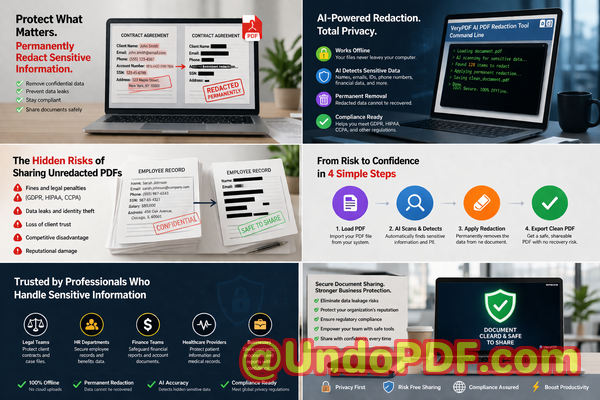
Last month, we nearly made a costly mistake. A contract we were about to upload to a shared cloud folder still contained client email addresses, internal pricing notes, and even a scanned ID number buried deep in the appendix. It looked fine at a glancethe sensitive parts were “blacked out.” But when someone tried copying the text, everything was still there.
That moment was a wake-up call.
In today’s business environment, sharing PDFs is routine. Contracts, HR files, financial reports, legal agreementseverything flows through cloud storage and email. But what many teams underestimate is how easily sensitive data can slip through, even when it looks hidden.
And when it does, the consequences aren’t minor. We’re talking about compliance violations, reputational damage, legal exposure, and sometimes even financial penalties.
Let’s talk about why this happensand how to fix it properly.
The Hidden Risks Behind “Redacted” PDFs
At first glance, redacting a PDF seems simple. Open the file, draw black boxes over sensitive areas, save, and send. That’s what many teams do.
The problem? That’s not real redaction.
Here are some of the most common (and dangerous) business pain points I’ve seen:
1. “Blacked-Out” Text That Isn’t Actually Removed
One of the biggest misconceptions is that covering text visually equals removing it.
In reality:
-
The underlying text often remains intact
-
Anyone can copy-paste or extract it
-
Some tools allow full recovery of “hidden” content
This creates a false sense of security. I’ve personally seen contracts where confidential clauses were still retrievableeven though they looked completely redacted.
That’s not just a technical flawit’s a legal risk.
2. Accidental Exposure of Sensitive Data
Businesses handle all kinds of sensitive information daily:
-
Personally identifiable information (PII)
-
Financial details
-
Internal pricing strategies
-
Legal notes and comments
When documents are shared externallyespecially via cloud storageany missed detail becomes a potential leak.
Imagine:
-
Sending a client proposal that still contains internal margin calculations
-
Sharing HR documents with unredacted employee IDs
-
Uploading legal files with confidential annotations
These aren’t hypothetical scenariosthey happen more often than people admit.
3. Unsafe Online Redaction Tools
This is another major risk I see teams overlook.
Many people turn to free online tools to redact PDFs quickly. It’s convenientbut extremely risky.
Here’s why:
-
Files are uploaded to third-party servers
-
You have no control over data storage or retention
-
Sensitive documents could be logged, cached, or exposed
For industries dealing with legal, medical, or financial data, this is a compliance nightmare.
If your documents contain confidential information, uploading them to unknown servers is the last thing you want to do.
Why Traditional Methods Fall Short
Before we found a better solution, our workflow looked like this:
-
Manually scan documents for sensitive data
-
Use basic PDF editors to cover content
-
Double-check everything (and still miss things)
It was slow, error-prone, and stressful.
Even with careful review, we couldn’t guarantee that:
-
All sensitive data was found
-
Nothing was recoverable
-
The document was truly safe to share
That’s when we started looking for something more reliable.
A Smarter Way: AI-Powered PDF Redaction That Actually Works
What changed everything for us was switching to VeryPDF AI PDF Redaction Tool Command Line.
Instead of relying on manual effort or unsafe tools, this solution uses AI to detect and permanently remove sensitive datacompletely offline.
Let me break down why this matters.
Automatic Detection of Sensitive Information
One of the most powerful features is AI-based detection.
The tool can identify:
-
Names and personal identifiers
-
Email addresses and phone numbers
-
Financial information
-
IDs, account numbers, and more
This eliminates one of the biggest risks: human oversight.
Instead of manually scanning hundreds of pages, the system does the heavy lifting for you.
Permanent Removal (Not Just Visual Hiding)
This is the critical difference.
With proper redaction:
-
The data is completely removed from the file
-
It cannot be copied, extracted, or recovered
-
The document is safe for distribution
This is what compliance standards expectand what most basic tools fail to deliver.
100% Offline Processing
This was a non-negotiable requirement for us.
With VeryPDF’s command-line tool:
-
Files never leave your system
-
No uploads to external servers
-
Full control over your data
This alone eliminates a huge category of risk.
For industries bound by strict data protection regulations, offline processing isn’t just a featureit’s essential.
Real Business Scenarios Where This Matters
Let me share a few real-world examples that highlight the impact.
Scenario 1: Avoiding a GDPR Violation
A colleague in a legal team was preparing documents for external review. The files included:
-
Client names
-
Contact details
-
Internal notes
Using traditional methods, some of this information would likely have slipped through.
With AI redaction:
-
All personal data was automatically flagged
-
Sensitive sections were permanently removed
-
The final document was fully compliant
That one step potentially avoided a serious GDPR issue.
Scenario 2: Protecting Internal Business Secrets
In another case, a company was sharing a proposal with a potential partner.
The document included:
-
Pricing structures
-
Internal cost breakdowns
-
Negotiation notes
Before sending, they used AI redaction to remove:
-
Confidential financial data
-
Internal comments
-
Strategic details
The result? A clean, professional document with zero risk of exposing sensitive information.
Scenario 3: Moving Away from Online Tools
We used to rely on browser-based tools for quick edits.
But once we realized the risks, we switched to an offline workflow:
-
No uploads
-
No third-party access
-
Complete data ownership
This change alone significantly improved our security posture.
A Simple, Practical Workflow
One of the things I appreciate most is how straightforward the process is.
Here’s a typical workflow:
-
Load the PDF into the system
-
Run AI detection to identify sensitive content
-
Review flagged areas
-
Apply redaction
-
Export a clean, secure PDF
That’s it.
No complicated setup. No guesswork.
What Should You Always Redact?
If you’re handling business documents, here are the key categories to watch:
-
Personal identifiable information (PII)
-
Names, addresses, phone numbers
-
-
Financial data
-
Bank details, invoices, pricing
-
-
Legal content
-
Confidential clauses, annotations
-
-
Internal business information
-
Strategies, margins, proprietary data
-
-
Identification numbers
-
Passports, employee IDs, account numbers
-
If it’s sensitive, it should be removednot hidden.
Why This Matters More Than Ever
With remote work, cloud collaboration, and digital workflows becoming standard, document sharing is constant.
But so are the risks.
A single oversight can lead to:
-
Data breaches
-
Compliance violations
-
Loss of client trust
-
Legal consequences
And the worst part? Most of these incidents are preventable.
A Better Standard for Secure Document Sharing
After implementing AI-powered redaction, our approach changed completely.
We no longer ask:
“Did we hide everything?”
Instead, we ask:
“Is this data permanently removed and safe?”
That shift makes all the difference.
Final Thoughts and Recommendation
If your business regularly shares PDFsand let’s be honest, most doyou cannot afford to rely on manual redaction or online tools.
From my experience, using VeryPDF AI PDF Redaction Tool Command Line solves the core problems:
-
It detects sensitive data automatically
-
It removes it permanently
-
It keeps everything offline and secure
I highly recommend this to anyone who needs to share documents safely without risking data leaks or compliance issues.
Try it now and securely redact your PDFs:
https://veryutils.com/smart-redact-server-ai-powered-pdf-redaction-software
Start your free trial today and ensure your sensitive data is permanently removed before sharing.
Frequently Asked Questions
1. How can I permanently remove sensitive data from a PDF instead of just hiding it?
You need a tool that performs true redaction, meaning it deletes the underlying data layer. AI-powered tools like VeryPDF ensure the information is completely removed, not just visually covered.
2. Can others recover redacted information from my PDF?
If you use basic methods like drawing black boxes, yes. Proper redaction tools permanently erase the data, making recovery impossible.
3. Is it safe to use online PDF redaction tools?
In most cases, no. Uploading sensitive documents to third-party servers introduces privacy and security risks, especially for confidential business data.
4. Does this tool work completely offline?
Yes. VeryPDF AI PDF Redaction Tool Command Line processes files locally, ensuring your data never leaves your system.
5. What types of sensitive data can be automatically detected and removed?
It can detect names, emails, phone numbers, financial data, identification numbers, and other sensitive content using AI.
6. How does this help with GDPR compliance?
By permanently removing personal data before sharing, you reduce the risk of unauthorized exposure, which is a key requirement under GDPR.
7. Is manual redaction still necessary?
Manual review can complement AI detection, but relying solely on manual redaction increases the risk of missing sensitive information.
8. Can I use this tool for large batches of documents?
Yes. The command-line interface is ideal for processing multiple files efficiently, making it suitable for enterprise workflows.
9. What industries benefit most from this solution?
Legal, healthcare, finance, HR, and any business handling confidential data benefit significantly from secure redaction.
10. Does redaction affect document quality or formatting?
No. Proper redaction removes sensitive content while preserving the overall structure and readability of the document.
11. How do I know if my current redaction method is ?
Try copying text from a redacted area. If it’s still accessible, your method is not secure.
12. Can this tool help prevent internal data leaks?
Absolutely. By removing sensitive internal information before sharing, it reduces the risk of accidental exposure to clients or partners.
Tags and Keywords
redact sensitive data, remove confidential information, PDF redaction tool, protect privacy in PDFs, prevent data leaks, offline PDF redaction, secure document sharing, AI PDF redaction, GDPR compliance, document security