Stop Data Leaks: Secure PDF Sharing by Permanently Redacting Sensitive Information with AI
Sensitive data leaks rarely happen because of hackersthey often happen because of small, preventable mistakes.
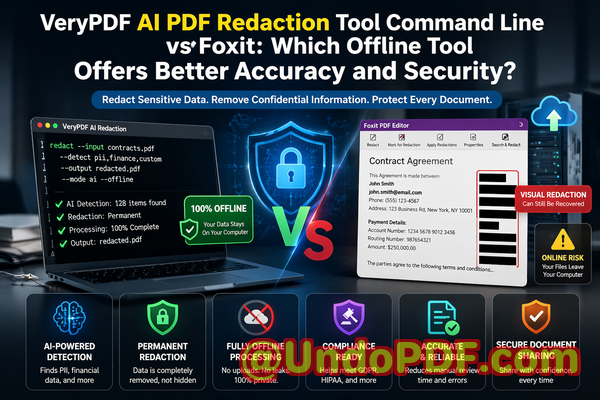
Last month, a colleague shared a PDF contract with a new partner. Everything looked fine at first glance. Key clauses were blacked out, personal details seemed hidden. But a few days later, someone copied text from the “redacted” sectionand the supposedly hidden information appeared in plain text. Names, email addresses, and internal pricing details were all exposed. What looked like a simple oversight quickly turned into a serious compliance risk, with potential GDPR implications and reputational damage.
If you’ve ever shared documents externallycontracts, reports, HR recordsyou’ve probably faced this same anxiety:
“Did I really remove all sensitive data or just hide it?”
That distinction matters more than most people realize.
The Hidden Risks Behind Everyday Document Sharing
In many organizations, sharing PDFs is routine. But beneath that routine lies a set of risks that can quietly escalate into major problems.
Let me walk you through a few scenarios I’ve personally seenor heard from teams dealing with real consequences.
1. “Redacted” Data That Isn’t Actually Removed
One of the most common mistakes is relying on visual redactiondrawing black boxes over sensitive text.
It looks secure. It feels secure. But it often isn’t.
In many cases:
-
The underlying text is still embedded in the document.
-
Anyone can copy and paste it into another file.
-
Even worse, some tools allow extraction of hidden layers.
This means:
-
Confidential client names can be exposed.
-
Financial figures can be recovered.
-
Legal clauses can be revealed.
And suddenly, what you thought was a safe document becomes a liability.
2. Accidental Exposure of Personally Identifiable Information (PII)
Think about how many documents contain:
-
Names
-
Email addresses
-
Phone numbers
-
National IDs
-
Bank details
Now imagine sending those documents externally without properly removing that data.
That’s not just a mistakeit’s a compliance risk.
Under regulations like GDPR:
-
You can face fines for improper handling of personal data.
-
You may be required to report the breach.
-
Your organization’s credibility can take a serious hit.
I’ve seen teams scramble to recall documents after realizing sensitive information was still inside. By then, it’s often too late.
3. Risky Use of Online Redaction Tools
Another common practice is using free online tools to redact PDFs.
On the surface, they’re convenient:
-
Upload your file
-
Apply redaction
-
Download the result
But here’s the problem:
-
You’re uploading confidential documents to third-party servers.
-
You often have no visibility into how those files are stored or processed.
-
There’s no guarantee the data is deleted.
For businesses handling:
-
Legal contracts
-
Financial statements
-
Medical records
-
HR documents
This introduces a completely new layer of risk.
You’re not just trying to protect datayou’re potentially exposing it in the process.
Why Traditional Redaction Methods Fall Short
Before diving into solutions, it’s important to understand why so many existing approaches fail.
Most teams rely on:
-
Basic PDF editors
-
Manual processes
-
Visual masking techniques
These methods are:
-
Time-consuming
-
Error-prone
-
Inconsistent across teams
More importantly, they lack two critical capabilities:
-
Reliable detection of sensitive information
-
Permanent removal of that information
Without both, you’re essentially guessing.
And in business, guessing with confidential data is dangerous.
A Smarter Approach: AI-Powered PDF Redaction That Actually Removes Data
This is where the VeryPDF AI PDF Redaction Tool Command Line changes the game.
Instead of relying on manual effort or superficial masking, it introduces a structured, automated, and secure way to handle document redaction.
Let’s break down how it addresses the real problems businesses face.
Automatically Detect Sensitive Data with AI
One of the biggest challenges in redaction is knowing what to remove.
Sensitive information isn’t always obviousespecially in large documents.
The tool uses AI to automatically identify:
-
Names and personal identifiers
-
Email addresses and phone numbers
-
Financial data
-
ID numbers
-
Custom-defined keywords (e.g., internal project names)
This means:
-
You don’t have to manually scan hundreds of pages.
-
You reduce the risk of missing critical information.
-
You gain consistency across all documents.
For example, in a legal team:
-
Every contract can be scanned for client data before sharing.
-
Redaction becomes standardized instead of subjective.
Permanently Remove Confidential Information
Here’s the key difference:
This isn’t visual maskingit’s actual data removal.
Once redaction is applied:
-
The underlying text is completely deleted.
-
It cannot be copied, extracted, or recovered.
-
The document is safe for distribution.
This eliminates one of the most dangerous assumptions in document handlingthat blacked-out text equals security.
It doesn’t.
Only permanent removal does.
Fully Offline Processing for Maximum Privacy
This is one of the most critical advantages.
Unlike online tools:
-
Documents are processed entirely on your local system.
-
Nothing is uploaded to external servers.
-
You maintain full control over your data.
For organizations dealing with:
-
Confidential client information
-
Legal documents
-
Financial reports
-
Internal strategies
This is non-negotiable.
It ensures:
-
Zero exposure to third-party risks
-
Full compliance with internal data policies
-
Peace of mind when handling sensitive files
Designed for Real Business Workflows
What I appreciate most is how practical the workflow is.
It’s not complicated or overly technical.
A typical process looks like this:
-
Load your PDF document
-
Run AI detection for sensitive data
-
Review identified elements
-
Apply redaction rules
-
Export a clean, secure PDF
This can be integrated into:
-
DevOps pipelines
-
Document management systems
-
Automated compliance workflows
For teams handling large volumes of documents, this is a major efficiency gain.
Common Types of Data You Should Always Redact
From experience, here are the categories that most often create risk:
-
Personally Identifiable Information (PII)
-
Names
-
Addresses
-
Contact details
-
Identification numbers
-
-
Financial Information
-
Bank account numbers
-
Payment details
-
Salary data
-
-
Business-Sensitive Data
-
Pricing structures
-
Internal communications
-
Strategic plans
-
-
Legal and Confidential Clauses
-
Proprietary agreements
-
Confidential terms
-
Non-public disclosures
-
If even one of these slips through, it can lead to serious consequences.
Real-World Example: Avoiding a Compliance Violation
A mid-sized consulting firm needed to share project reports with an external partner.
The reports included:
-
Client names
-
Internal cost structures
-
Staff assignments
Initially, they used manual redaction in a standard PDF editor.
During a routine check, they discovered:
-
Hidden text was still extractable
-
Sensitive data remained embedded
They switched to an AI-powered redaction workflow.
Result:
-
All sensitive fields were automatically detected
-
Data was permanently removed
-
Reports were safely shared without compliance concerns
That one change likely saved them from:
-
A potential data breach
-
Regulatory scrutiny
-
Client trust issues
Another Scenario: Moving Away from Online Tools
An HR department was regularly redacting employee records using online tools.
They didn’t realize:
-
Files were being uploaded externally
-
There was no clear deletion policy
After reviewing internal security policies, they transitioned to an offline solution.
The impact:
-
Full control over employee data
-
No external exposure
-
Improved compliance with internal and legal standards
Sometimes, the biggest risk isn’t what you seeit’s what happens behind the scenes.
Why This Matters More Than Ever
Data privacy is no longer optional.
With increasing regulations and growing awareness:
-
Clients expect their data to be protected
-
Regulators expect strict compliance
-
Businesses are held accountable for mistakes
A single document leak can lead to:
-
Financial penalties
-
Legal complications
-
Reputational damage
And most of the time, it’s preventable.
Practical Tips for Safer Document Handling
If you’re serious about protecting sensitive data, here are a few best practices:
-
Never rely on visual redaction alone
-
Always verify that data is permanently removed
-
Avoid uploading confidential files to online tools
-
Standardize redaction processes across teams
-
Use automated detection to reduce human error
These steps may seem simple, but they make a significant difference.
Final Thoughts: A Safer Way to Share Documents
At the end of the day, document sharing is unavoidable in business.
But data leaks don’t have to be.
What matters is how you handle sensitive information before hitting “send.”
From my perspective, the biggest shift is moving from:
-
Manual, error-prone processes
to
-
Automated, reliable, and secure workflows
That’s exactly what the VeryPDF AI PDF Redaction Tool Command Line enables.
It doesn’t just make redaction easierit makes it trustworthy.
I highly recommend this to anyone who needs to share documents safely without risking data leaks or compliance issues.
Try it now and securely redact your PDFs:
https://veryutils.com/smart-redact-server-ai-powered-pdf-redaction-software
Start your free trial today and ensure your sensitive data is permanently removed before sharing.
Frequently Asked Questions
1. How can I permanently remove sensitive data from a PDF instead of just hiding it?
You need a tool that deletes the underlying text layer, not just visually masks it. AI-powered redaction tools ensure the data is completely removed and unrecoverable.
2. Can others recover redacted information from my PDF?
If you use basic redaction methods, yes. But with proper AI-based redaction that removes data permanently, recovery is not possible.
3. Is it safe to use online PDF redaction tools?
Not always. Uploading confidential documents to third-party servers introduces privacy risks and potential data exposure.
4. Does this tool work completely offline?
Yes. The VeryPDF AI PDF Redaction Tool Command Line processes documents locally, ensuring full privacy and control.
5. What types of sensitive data can be automatically detected and removed?
It can detect names, emails, phone numbers, IDs, financial data, and custom-defined sensitive keywords.
6. How can I ensure compliance with GDPR when sharing documents?
By permanently removing all personal data before sharing and avoiding external processing tools, you significantly reduce compliance risks.
7. Is manual redaction still reliable?
Manual redaction is prone to human error and often fails to remove underlying data completely.
8. Can this tool handle large volumes of documents?
Yes. It’s designed for scalable workflows and can be integrated into automated systems.
9. What industries benefit most from AI PDF redaction?
Legal, healthcare, finance, HR, and any sector handling confidential information benefit significantly.
10. How does AI improve redaction accuracy?
AI identifies patterns and sensitive data automatically, reducing the chance of missed information.
11. Can I customize what gets redacted?
Yes. You can define specific keywords or data types based on your business needs.
12. Does redaction affect document quality?
No. The output PDF remains clean and professional while ensuring sensitive data is removed.
Tags and Keywords
redact sensitive data, remove confidential information, PDF redaction tool, protect privacy in PDFs, prevent data leaks, offline PDF redaction, secure document sharing, AI PDF redaction, GDPR compliance, document security