Secure Your PDFs: Permanently Redact Sensitive Data to Prevent Business Risks
Last month, we shared a PDF contract with a new partner, only to realize hours later that it still contained unredacted personal dataemails, phone numbers, and internal notes meant to stay confidential. The thought of a potential GDPR violation, fines, and reputational damage hit immediately. As a business professional handling sensitive documents daily, I know this scenario isn’t unique. Many companies underestimate the hidden risks in sharing PDFs, assuming that blacking out text or using an online tool is enoughbut it’s not.
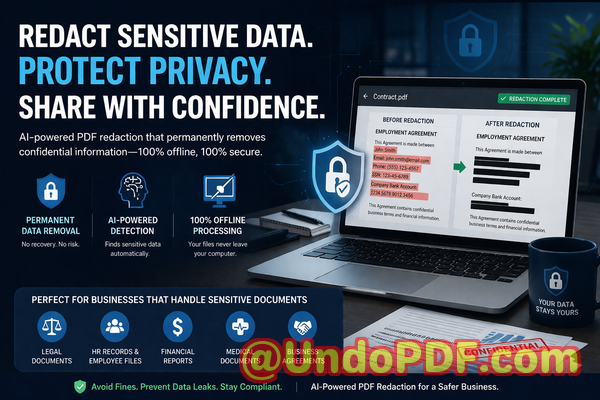
The reality is, sensitive informationranging from employee records to client contractscan be recovered from poorly redacted PDFs. This can lead to accidental leaks, compliance violations, or even legal exposure. Fortunately, with AI-powered solutions like VeryPDF AI PDF Redaction Tool Command Line, businesses can permanently remove confidential information while keeping the process fully offline and secure.
Why Businesses Struggle with PDF Privacy
Sharing documents safely is more complicated than it seems. Even with precautions, three major pain points keep organizations at risk:
1. Accidental Exposure of Sensitive Data
Think about contracts, financial reports, HR files, or medical records. These PDFs often contain names, emails, phone numbers, ID numbers, or financial details. If even one file is shared incorrectly, sensitive data can slip into the wrong hands. In regulated industries, this isn’t just inconvenientit’s a compliance nightmare. GDPR, HIPAA, and other privacy laws impose strict requirements, and fines can be significant.
2. Manual Redaction Errors
Many teams still rely on manually highlighting or blacking out text in PDFs. The problem? Redaction that only hides text visually doesn’t remove it from the file. Someone with basic PDF knowledge or recovery tools can copy, extract, or search the hidden data. A simple oversight can turn a supposedly “safe” document into a serious data leak.
3. Risks of Online Tools
Some employees turn to free online PDF editors to redact sensitive information. While convenient, these tools often upload documents to unknown servers. For a legal team sharing contracts or an HR department handling employee data, this is a serious risk. Once the data leaves your environment, you no longer have control over its security.
How VeryPDF AI PDF Redaction Tool Command Line Solves These Problems
VeryPDF’s AI-powered PDF Redaction Tool Command Line addresses these challenges directly with an enterprise-friendly solution. Here’s how it helps:
Automatic Detection and Redaction of Sensitive Data
Instead of manually hunting for emails, phone numbers, IDs, or financial information, the tool scans documents and identifies sensitive data automatically. AI algorithms recognize patterns and ensure nothing slips through.
Permanent Removal, Not Just Hiding
Unlike visual redaction methods, the AI tool removes the data entirely from the PDF. Once processed, there’s no way to recover redacted information, reducing the risk of accidental leaks or regulatory penalties.
Fully Offline Processing
All work happens locally on your computer or server. No documents are uploaded to third-party servers, guaranteeing full privacy protection and compliance with internal security policies.
Practical Example in a Business Workflow:
-
Load PDF Add documents to the tool.
-
Detect Sensitive Data AI scans and highlights PII, financial data, or confidential clauses.
-
Review Confirm which items need redaction.
-
Apply Redaction Permanently remove all sensitive content.
-
Export Clean PDF Safely share with clients, partners, or stakeholders.
Real Business Scenarios Where AI Redaction Prevented Issues
Scenario 1: Legal Team Avoids Compliance Violation
A mid-sized law firm needed to share client contracts with an external partner. Using traditional black-out methods, a small section containing personal IDs remained visible in the file’s metadata. Switching to VeryPDF AI PDF Redaction Tool ensured all sensitive content was permanently removed, preventing a potential GDPR violation.
Scenario 2: HR Department Secures Employee Records
HR teams often handle spreadsheets and PDFs full of employee salaries, tax IDs, and personal contacts. One accidental email could have leaked confidential information. By using offline AI redaction, the department could safely share performance reports and payroll summaries without exposing private data.
Scenario 3: Finance Team Shares Reports Safely
Financial reports contain sensitive client and internal data. A company previously used free online redaction tools, risking exposure on third-party servers. Moving to an offline AI-powered solution eliminated that risk entirely. The finance team could confidently send reports to auditors and partners without compromising security.
Common Types of Data to Redact
-
Personal Identifiable Information (PII): Names, email addresses, phone numbers, social security numbers, government IDs.
-
Financial Data: Bank details, account numbers, revenue or salary figures.
-
Business Secrets: Internal strategies, pricing models, vendor information.
-
Legal or Confidential Clauses: Terms in contracts, NDAs, or internal memos.
Why Offline AI Redaction is the Smart Choice
-
Data Never Leaves Your Environment: Protects sensitive information from third-party exposure.
-
Reduces Risk of Accidental Leaks: AI ensures nothing is missed, even in complex documents.
-
Supports Compliance: Helps meet GDPR, HIPAA, and internal security policies.
-
Saves Time and Effort: Automated detection means less manual review and fewer human errors.
Steps to Implement a Secure PDF Redaction Workflow
-
Identify all PDFs requiring redaction (contracts, reports, HR files).
-
Load them into the VeryPDF AI PDF Redaction Tool Command Line.
-
Let AI detect sensitive content across all pages.
-
Review highlighted areas and confirm items for removal.
-
Apply redaction and export finalized PDFs.
-
Safely share the cleaned PDFs with partners, clients, or regulators.
This workflow ensures that every document leaving your organization is clean, safe, and compliant.
Conclusion
Data breaches, compliance risks, and accidental leaks are not hypotheticalthey happen every day in businesses that underestimate the danger of poorly handled PDFs. VeryPDF AI PDF Redaction Tool Command Line provides a practical, fully offline solution to permanently remove sensitive information. From legal teams to HR and finance departments, it protects privacy, prevents data leaks, and ensures regulatory compliance.
I highly recommend this to anyone who needs to share documents safely without risking data leaks or compliance issues. Try it now and securely redact your PDFs: VeryPDF Smart Redact AI-Powered PDF Redaction Software. Start your free trial today and ensure your sensitive data is permanently removed before sharing.
Frequently Asked Questions
1. How can I permanently remove sensitive data from a PDF instead of just hiding it?
Use AI-powered redaction tools like VeryPDF, which remove data entirely from the file, not just visually hide it.
2. Can others recover redacted information from my PDF?
When using proper AI redaction offline, the data is permanently deleted and cannot be recovered.
3. Is it safe to use online PDF redaction tools?
Not always. Online tools often upload documents to third-party servers, creating a potential privacy and compliance risk.
4. Does this tool work completely offline?
Yes. VeryPDF’s solution processes documents locally, ensuring 100% privacy.
5. What types of sensitive data can be automatically detected and removed?
PII, financial data, business secrets, legal clauses, emails, phone numbers, IDs, and more.
6. How can I ensure compliance with GDPR when sharing documents?
Permanently redact all personal and sensitive information before sharing, and ensure no documents are uploaded to untrusted servers.
7. Can AI redaction handle large batches of PDFs?
Yes, the command line tool is optimized for batch processing, saving time and ensuring consistency.
8. Do I need technical skills to use this tool?
Basic familiarity with command line operations is sufficient, and the workflow is straightforward.
9. Will the redacted PDF remain readable for authorized users?
Yes. Only sensitive data is removed; the document’s content, formatting, and readability remain intact.
10. Can this tool help prevent accidental data leaks during email or client sharing?
Absolutely. By permanently removing confidential information before sharing, it eliminates the risk of accidental leaks.
11. Are there scenarios where AI redaction is better than manual redaction?
Yes, especially for large or complex documents where manual redaction is error-prone and time-consuming.
12. Is this suitable for legal, HR, and financial departments?
Yes. Any department handling sensitive PDFs benefits from automated, offline redaction.
Keywords
redact sensitive data, remove confidential information, PDF redaction tool, protect privacy in PDFs, prevent data leaks, offline PDF redaction, secure document sharing, AI PDF redaction, GDPR compliance, business document security