How to Permanently Redact Sensitive Data in PDFs and Protect Your Business Privacy
Last month, we shared a PDF contract with a partner, only to realize later that it still contained unredacted employee information and client contact details. The panic was realany leak could have led to a serious GDPR violation and reputational damage. This isn’t an isolated scenario. Every day, businesses inadvertently expose sensitive information in documents, creating compliance risks, legal exposure, and costly mistakes that could have been avoided.
Sensitive information in PDFswhether contracts, HR records, financial reports, or internal logsis a ticking time bomb. One accidental email, one misused redaction tool, or one employee uploading a file to an online service can put your organization at risk. But there’s a practical, secure solution that keeps your data safe: the VeryPDF AI PDF Redaction Tool Command Line.
Imagine being able to share documents with partners, clients, or auditors, knowing that every piece of confidential information is permanently removed, automatically detected, and never leaves your computer. No guesswork, no accidental exposures, just secure document sharing.
Many businesses face recurring problems when handling sensitive PDFs. Here are the most pressing pain points I’ve seen in real-world scenarios:
-
Unintentional exposure of confidential data: Names, emails, phone numbers, financial information, and internal IDs often remain in PDFs even after someone tries to “black out” text. A single overlooked field could mean a GDPR violation, regulatory fines, or client distrust.
-
Manual redaction errors: Highlighting and covering text with a black box may look safe, but the underlying content can often still be copied, searched, or extracted. This is a hidden risk many companies discover too late.
-
Use of insecure online tools: Employees sometimes use free online PDF redaction services, unknowingly uploading sensitive files to third-party servers. This creates exposure points for your data and undermines internal compliance protocols.
These issues are more than just inconvenientthey carry real consequences. Accidental data leaks can result in fines, lawsuits, and lost client trust. That’s where VeryPDF AI PDF Redaction Tool Command Line steps in.
This tool is designed specifically to address these business risks. It works fully offline, uses AI to detect sensitive information, and permanently removes confidential data from PDFs. Here’s how it changes the game:
-
Automatic detection of sensitive data: The AI scans your documents for personal identifiable information (PII), emails, phone numbers, financial data, IDs, and other confidential details. No manual searching required.
-
Permanent removal, not just hiding: Unlike visual redactions that can be copied or recovered, this tool ensures that the sensitive information is completely removed from the PDF file.
-
Offline processing for maximum privacy: Your documents never leave your computer. There’s no risk of accidental uploads, server leaks, or third-party exposure.
Consider this scenario: a legal team needed to share a batch of employment contracts with an external auditor. Using traditional redaction, several employee phone numbers remained accessible through copy-paste operations. By switching to VeryPDF AI PDF Redaction Tool, they scanned and redacted all sensitive fields in minutes, producing clean PDFs safe to share, fully compliant with GDPR.
Another example involves a financial department that routinely shares quarterly reports. Using online tools, they had previously uploaded sensitive revenue and client data, unknowingly exposing information. Once they adopted the offline AI-powered solution, the risk vanished entirelythe redaction process is performed locally, so sensitive data never touches the internet.
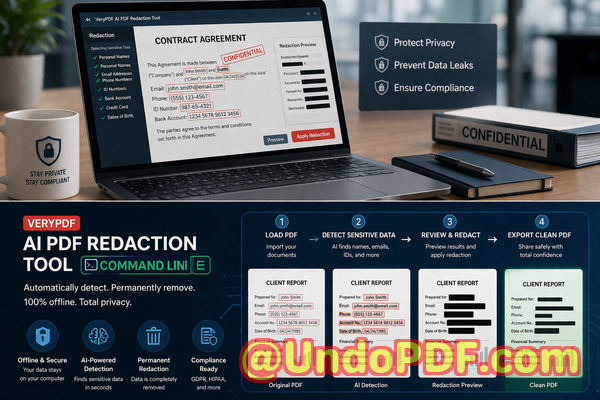
Here’s a practical workflow that shows how easy it is to integrate into your business processes:
-
Load PDF: Open the document you need to share.
-
Detect sensitive data: Let the AI scan for PII, financial info, IDs, and confidential clauses.
-
Review detected data: Confirm which fields need redaction.
-
Apply redaction: Permanently remove the sensitive information.
-
Export clean PDF: Share safely with partners, clients, or auditors.
Common types of data that should be redacted include:
-
Personal identifiable information (names, emails, addresses, phone numbers)
-
Financial data (account numbers, salaries, revenue figures)
-
Business secrets (strategies, pricing, internal memos)
-
Legal or confidential clauses (contractual obligations, NDA clauses)
For teams handling HR records, legal documents, or internal business agreements, the benefits are clear: you prevent costly errors, maintain compliance, and avoid the reputational fallout of a data leak.
I’ve personally recommended this tool to multiple departments in my organization. Legal, HR, and finance teams are now confident that every document leaving our network has been fully sanitized. One compliance officer remarked that switching to an offline, AI-driven redaction process reduced our audit preparation time by nearly 50%, all while eliminating the risk of sensitive information being exposed.
It’s simple but powerful. By using a reliable, offline AI PDF redaction tool, you can confidently share documents, secure your data, and prevent regulatory headaches.
Try it now and securely redact your PDFs: https://veryutils.com/smart-redact-server-ai-powered-pdf-redaction-software
Start your free trial today and ensure your sensitive data is permanently removed before sharing.
Frequently Asked Questions
Q: How can I permanently remove sensitive data from a PDF instead of just hiding it?
A: The AI PDF Redaction Tool removes data at the file level, not just visually, so the information is gone permanently.
Q: Can others recover redacted information from my PDF?
A: No. The tool ensures permanent deletion, making recovery impossible.
Q: Is it safe to use online PDF redaction tools?
A: Online tools carry risks since your documents leave your computer. Offline AI redaction ensures full privacy.
Q: Does this tool work completely offline?
A: Yes. All processing is local, so sensitive data never leaves your system.
Q: What types of sensitive data can be automatically detected and removed?
A: PII, emails, phone numbers, financial information, IDs, business secrets, and legal clauses.
Q: How does this help with GDPR compliance?
A: By permanently removing personal data from documents before sharing, you mitigate the risk of violating GDPR requirements.
Q: Can I automate redaction for multiple PDFs at once?
A: Yes, the command line interface allows batch processing for large volumes of documents.
Q: How do I review what the AI detected before redaction?
A: The tool provides a preview of sensitive fields so you can confirm or adjust redactions.
Q: Does it require technical expertise to use?
A: Not at all. Basic command line usage is straightforward, and detailed guides are available.
Q: Will my original PDF formatting be preserved?
A: Yes. Redaction removes sensitive data while maintaining layout, fonts, and structure.
Q: Can I use it for legal contracts and HR documents?
A: Absolutely. Any document containing confidential or sensitive information can be safely redacted.
Q: What if I need to redact financial reports or proprietary business data?
A: The AI detects numerical, textual, and confidential clauses, making it ideal for financial and business-sensitive documents.
Keywords/Tags:
redact sensitive data, remove confidential information, PDF redaction tool, protect privacy in PDFs, prevent data leaks, offline PDF redaction, secure document sharing, AI PDF redaction, GDPR compliant redaction, permanent data removal