Prevent Costly Data Breaches by Permanently Redacting Sensitive PDFs Before Sharing
Sharing documents is a daily part of business, but what happens when sensitive information slips through the cracks? Last month, we sent a PDF contract to a partner, only to discover afterward that it still contained unredacted employee dataemails, phone numbers, and even social security numbers. The risk of a GDPR violation and potential lawsuits became instantly real. This is a scenario many businesses face: sensitive data unintentionally exposed, creating legal and financial consequences.
Accidental leaks like this aren’t just embarrassingthey’re costly. Companies can face regulatory fines, reputational damage, and operational setbacks. The challenge often lies in properly redacting documents before sharing, particularly when using traditional tools that only hide data visually or require risky online uploads.
This is where AI-powered PDF redaction comes in, offering a practical, fully offline solution that permanently removes sensitive information and ensures your documents are safe to share.
Many businesses underestimate the risks of improperly handled PDFs. Consider these common pain points:
-
Exposed personal data: Names, emails, phone numbers, or financial information left in shared PDFs can trigger compliance violations, especially under GDPR or HIPAA regulations. For example, HR departments regularly share employee data with external auditors, and a single oversight can create liability.
-
Ineffective manual redaction: Simply blacking out text isn’t enough. Many tools leave the underlying data intact, meaning anyone can copy and recover sensitive information from the PDF. Legal teams often discover this too late, after documents have circulated.
-
Unsafe online tools: Employees sometimes use free online redaction websites, unknowingly uploading confidential company files to third-party servers. The convenience comes at the cost of absolute data security.
For organizations serious about privacy and compliance, these risks are non-negotiable.
How AI-Powered PDF Redaction Solves These Risks
VeryPDF AI PDF Redaction Tool Command Line offers a practical solution to visible business risks by combining AI intelligence with full offline processing. Here’s how it works in real-world scenarios:
-
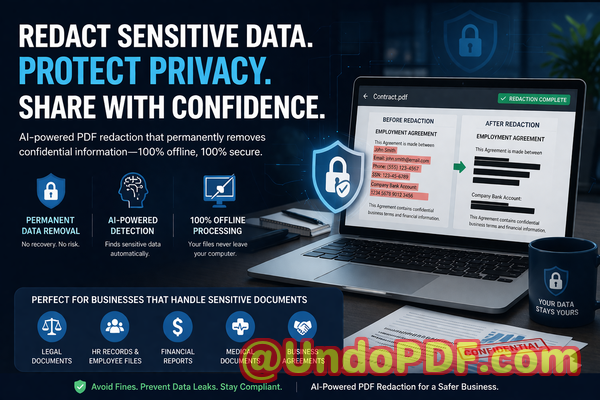
Automatic detection of sensitive data: The AI scans PDFs for names, emails, phone numbers, IDs, financial data, and other PII. For instance, a legal team preparing contracts for multiple clients can automatically identify every personal or confidential detail without manual oversight.
-
Permanent removal of information: Unlike traditional redaction, the tool permanently deletes the sensitive content, not just covering it with black bars. This ensures no one can recover the hidden data.
-
Fully offline processing: All redaction happens locally on your computer. Documents never leave your network, eliminating the risk of exposure through online uploads. This is critical for highly regulated industries like healthcare or finance.
Imagine a scenario where your company needs to send financial statements to a partner. Using conventional methods, an employee might redact account numbers with a marker tool, thinking the data is safe. With VeryPDF AI PDF Redaction, the same PDF undergoes AI detection, identifies all account numbers, social IDs, and emails, and permanently removes them. The final exported document is safe to share, compliant, and free from recoverable sensitive information.
Real Business Examples and Use Cases
-
Avoiding compliance violations: A mid-sized law firm avoided a GDPR fine by using AI redaction to clean client files before sharing them with external advisors. Previously, employees manually blacked out sensitive details, but overlooked a few key identifiers. After switching to AI-powered redaction, they now automatically remove all PII, ensuring compliance with minimal effort.
-
Offline security: A healthcare provider switched from online PDF redaction tools to VeryPDF AI Redaction. By processing files offline, they prevented accidental uploads of patient information, reducing their risk exposure dramatically.
-
Protecting intellectual property: A software company sharing internal contracts with a contractor accidentally left proprietary formulas visible. The AI redaction tool flagged and removed the sensitive sections before sharing, safeguarding their business secrets.
Step-by-Step Workflow for Safe Document Sharing
To implement AI-powered redaction effectively, follow these practical steps:
-
Load your PDF document into the VeryPDF AI PDF Redaction Tool.
-
Detect sensitive data automatically using AI. This includes:
-
Personal identifiable information (PII)
-
Financial data (bank accounts, invoices, salary info)
-
Business secrets (formulas, pricing data)
-
Legal or confidential clauses in contracts
-
-
Review identified content to ensure accuracy.
-
Apply permanent redaction to remove sensitive data completely.
-
Export the clean PDF ready for secure sharing.
This workflow is designed for efficiency and security, making it easy for busy professionals to maintain compliance without sacrificing speed.
Benefits of Permanent PDF Redaction
The advantages of using a tool like VeryPDF AI PDF Redaction are concrete:
-
Prevent accidental data leaks: With sensitive information removed permanently, you no longer risk fines or legal exposure from shared documents.
-
Reduce reliance on risky online services: Offline processing ensures your documents never leave your network, protecting intellectual property and PII.
-
Compliance assurance: Meet GDPR, HIPAA, and other regulatory standards effortlessly, giving peace of mind to legal and compliance teams.
-
Efficiency and accuracy: Automated AI detection reduces human error, saving time while improving document quality.
These benefits translate directly into measurable business outcomesless risk, fewer compliance headaches, and stronger client trust.
Conclusion
In today’s digital workplace, sharing PDFs safely isn’t optionalit’s essential. I’ve seen firsthand how improperly redacted documents can lead to compliance violations, reputational damage, and financial risk. VeryPDF AI PDF Redaction Tool Command Line provides a practical, offline solution that permanently removes sensitive data, prevents accidental leaks, and ensures your documents are fully compliant.
I highly recommend this to anyone who needs to share documents safely without risking data leaks or compliance issues. Try it now and securely redact your PDFs: https://veryutils.com/smart-redact-server-ai-powered-pdf-redaction-software. Start your free trial today and ensure your sensitive data is permanently removed before sharing.
Frequently Asked Questions (FAQ)
-
How can I permanently remove sensitive data from a PDF instead of just hiding it?
The AI PDF Redaction Tool identifies sensitive data and permanently deletes it, not just blacking it out visually.
-
Can others recover redacted information from my PDF?
No. Once redacted using the tool, the data is completely removed and cannot be recovered.
-
Is it safe to use online PDF redaction tools?
Online tools can expose sensitive documents to third parties. Offline processing is safer and recommended for confidential files.
-
Does this tool work completely offline?
Yes. All redaction occurs locally, ensuring your documents never leave your computer or network.
-
What types of sensitive data can be automatically detected and removed?
Names, emails, phone numbers, IDs, financial information, business secrets, and confidential legal clauses.
-
How can I ensure compliance with GDPR when sharing documents?
Use AI-powered redaction to permanently remove personal and sensitive data before sharing.
-
Can I batch process multiple PDFs at once?
Yes, the command line version allows batch processing, saving time for large document volumes.
-
Is it suitable for legal, HR, or financial documents?
Absolutely. Any document containing sensitive or confidential information benefits from permanent redaction.
-
Do I need technical skills to use the tool?
Basic familiarity with running commands is sufficient; AI handles the heavy lifting of data detection and removal.
-
What happens if I miss a sensitive item during review?
AI detection is designed to minimize misses, and you can manually confirm any items before final redaction.
-
Can it help protect trade secrets or intellectual property?
Yes. Proprietary formulas, pricing data, and internal strategies can be permanently redacted to prevent exposure.
-
Will redacted PDFs still be readable for non-sensitive content?
Yes. Only the sensitive data is removed; the rest of the document remains fully intact and readable.
Keywords: redact sensitive data, remove confidential information, PDF redaction tool, protect privacy in PDFs, prevent data leaks, offline PDF redaction, secure document sharing, AI PDF redaction, permanent redaction, GDPR compliance