How Businesses Can Safely Share PDFs by Redacting Sensitive Data at Scale
Last month, we shared a PDF contract with a new partner, only to realize later that it still contained unredacted employee emails and client details. That small oversight could have led to a serious GDPR violation and damaged our client’s trust. Situations like this happen far too oftensensitive information accidentally exposed in documents is a growing concern for businesses of all sizes. With thousands of PDFs circulating daily, manually redacting every file is not only time-consuming but also risky.
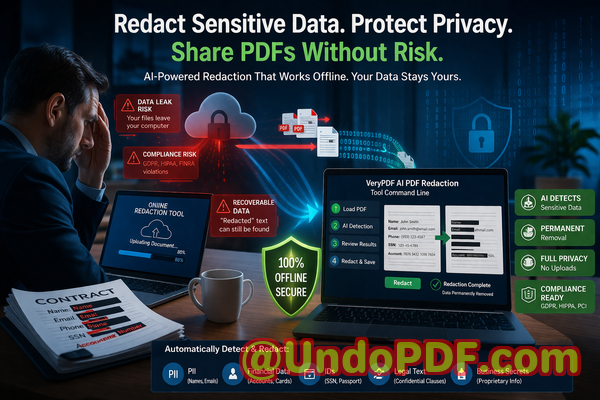
Imagine sending out an annual report containing employee salaries or client lists, only to discover later that someone could access the data easily. Or consider HR teams sharing medical records internally, thinking they’ve removed all identifiers, but failing to catch a few critical details. These scenarios aren’t hypotheticalthey happen frequently and have real consequences, from legal fines to reputational damage.
Common Risks Businesses Face When Sharing PDFs
1. Accidental Exposure of Sensitive Data
Sensitive dataincluding personal names, email addresses, financial details, social security numbers, and internal project informationcan easily be overlooked when preparing PDFs for sharing. Even one unredacted line in a contract, HR record, or financial statement can create a compliance nightmare. Businesses risk violating GDPR, CCPA, or other privacy regulations, potentially leading to fines that range from thousands to millions of dollars.
2. Manual Redaction Mistakes
Many companies still rely on manual redaction. Blacking out text in a PDF may look secure, but in reality, it’s often reversible. Copy-pasting or extracting the text from supposedly “blacked-out” areas can expose the hidden data. A single human error can undo hours of work, leaving confidential information accessible to anyone who knows how to extract it.
3. Unsafe Online Tools
Employees sometimes turn to free online PDF redaction tools for convenience. While tempting, these services often upload your files to external servers. This exposes sensitive information to unknown third parties, creating a major data security risk. Once uploaded, your confidential documents could be stored, cached, or even analyzed by a service without your consent.
A Practical Solution: AI-Powered PDF Redaction
This is where VeryPDF AI PDF Redaction Tool Command Line transforms document security. It addresses real business pain points while ensuring privacy and compliance.
Here’s how it works:
-
Automatic Detection of Sensitive Data: The tool uses AI to recognize personal names, emails, phone numbers, identification numbers, financial records, and more. You no longer have to hunt through every page manually.
-
Permanent Redaction: Unlike manual or cosmetic redactions, this tool removes confidential data completely. Once applied, the information cannot be recovered, copied, or extracted.
-
Offline Processing for Full Privacy: All operations happen locally on your computer. Sensitive documents never leave your network, protecting your business from accidental leaks or exposure to third-party servers.
How This Protects Your Business
Using AI-driven redaction not only saves time but also mitigates measurable risks:
-
Prevent Accidental Data Leaks: Every sensitive field is permanently removed before sharing, reducing the risk of compliance violations and potential fines.
-
Eliminate Third-Party Exposure: Because everything runs offline, there’s no risk of sensitive data being stored on an external server.
-
Ensure Compliance: By systematically removing personal and confidential information, your organization can confidently meet GDPR, HIPAA, and other data protection standards.
Real Business Scenarios
Scenario 1: HR Department Handling Employee Records
A mid-sized company needed to share medical leave documentation with a third-party HR consultancy. Previously, manual redaction left hidden patient names exposed. Switching to VeryPDF’s AI redaction tool allowed them to scan and clean all PDFs quickly, permanently removing any personal identifiers. The files were then safely shared without risk.
Scenario 2: Legal Teams Sharing Contracts
A law firm often shares contracts with multiple stakeholders. One contract included sensitive financial clauses and client identifiers. Using the offline AI redaction workflow, the firm ensured that all confidential sections were permanently removed before sending. This prevented potential legal exposure and preserved client confidentiality.
Scenario 3: Finance Departments Circulating Reports
A financial department had to distribute quarterly reports internally and externally. Some reports contained employee bonuses and sensitive client account numbers. By implementing automated redaction, they could remove all confidential information efficiently, protecting both the company and its clients.
Step-by-Step Workflow
-
Load PDF: Open the document in VeryPDF AI PDF Redaction Tool Command Line.
-
Detect Sensitive Data: Let the AI automatically identify personal and confidential information.
-
Review Suggestions: Confirm or adjust which data should be redacted.
-
Apply Redaction: Permanently remove selected sensitive data.
-
Export Clean PDF: Share the redacted file safely with partners, clients, or internal teams.
Common Types of Data to Redact:
-
Personal Identifiable Information (PII) names, addresses, phone numbers, emails
-
Financial data bank accounts, salaries, invoices
-
Business secrets project details, internal strategies, trade secrets
-
Legal/confidential clauses contracts, NDAs, agreements
Benefits for Business Professionals
-
Saves Time: Automates tedious redaction tasks, enabling staff to focus on higher-value work.
-
Reduces Human Error: Eliminates the risk of accidentally leaving sensitive information exposed.
-
Strengthens Compliance: Helps your organization demonstrate regulatory diligence in audits and reporting.
-
Protects Reputation: Prevents leaks that could damage client trust or public perception.
Conclusion
I’ve seen firsthand how quickly sensitive information can slip through the cracks, even in well-managed organizations. Implementing VeryPDF AI PDF Redaction Tool Command Line changed the game for our team. It allows us to share documents confidently, knowing that confidential data is permanently removed and compliance requirements are met.
I highly recommend this to anyone who needs to share documents safely without risking data leaks or compliance issues. Try it now and securely redact your PDFs: https://veryutils.com/smart-redact-server-ai-powered-pdf-redaction-software
Start your free trial today and ensure your sensitive data is permanently removed before sharing.
Frequently Asked Questions
1. How can I permanently remove sensitive data from a PDF instead of just hiding it?
Using VeryPDF AI PDF Redaction Tool, sensitive data is fully deleted from the document, not just blacked out, ensuring it cannot be recovered.
2. Can others recover redacted information from my PDF?
No. Once the redaction is applied, the information is permanently removed and cannot be accessed or copied.
3. Is it safe to use online PDF redaction tools?
Online tools can pose privacy risks because your documents are uploaded to third-party servers. Offline solutions like VeryPDF ensure your data never leaves your system.
4. Does this tool work completely offline?
Yes. All processing is local, protecting sensitive information from exposure or leaks.
5. What types of sensitive data can be automatically detected and removed?
Names, emails, phone numbers, identification numbers, financial data, medical information, business secrets, and confidential legal clauses.
6. How can I ensure compliance with GDPR when sharing documents?
By using AI-powered redaction to permanently remove personal data before sharing, you reduce the risk of violating privacy regulations.
7. Can I batch process multiple PDFs at once?
Yes. The command-line tool supports batch processing, allowing large-scale redaction efficiently.
8. How accurate is the AI detection of sensitive information?
The AI is trained to detect a wide range of sensitive data with high accuracy, minimizing the chance of missed items.
9. Can I review redaction suggestions before applying them?
Absolutely. You can review and approve all redactions to ensure accuracy and avoid unnecessary removal of non-sensitive data.
10. Is this tool suitable for legal, HR, or finance teams?
Yes. It’s designed for any team handling sensitive documents, including legal contracts, HR records, financial reports, and medical documents.
11. How does this tool help prevent accidental data leaks?
By permanently removing sensitive information offline, it ensures that even if PDFs are shared externally, no confidential data can be exposed.
12. Does this solution require technical expertise to use?
No. It’s designed for business users and professionals. Basic familiarity with PDF handling is sufficient.
Keywords
redact sensitive data, remove confidential information, PDF redaction tool, protect privacy in PDFs, prevent data leaks, offline PDF redaction, secure document sharing, AI PDF redaction, GDPR compliance, permanent data removal