Secure Your PDFs: AI-Powered Redaction to Prevent Data Leaks and Protect Privacy
Last month, I was preparing a batch of contracts to share with our international partners. Everything looked fine until I realized one of the PDFs still contained unredacted personal dataemails, phone numbers, even internal employee IDs. My heart sank. In one click, we could have exposed sensitive information, putting us at risk of GDPR violations, legal trouble, and irreparable reputational damage. If this scenario sounds familiar, you’re not alone. Many businesses face this hidden risk every day.
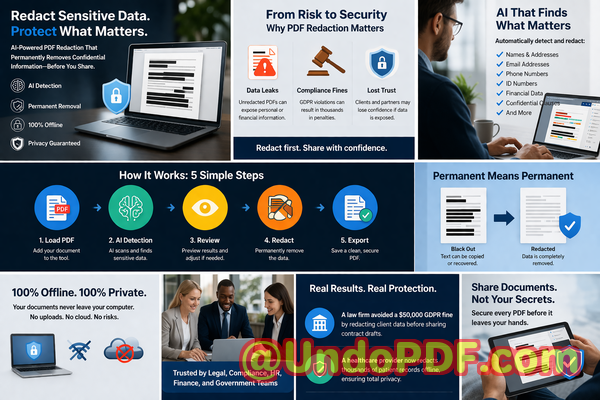
In today’s fast-paced environment, documents flow between departments, clients, and external partners at lightning speed. A single oversight can turn confidential information into a public liability. Traditional redaction methodsblackout boxes, manual editing, or free online toolsoften fail silently, leaving recoverable data behind or exposing your files to third-party servers. That’s where AI-powered PDF redaction, like the VeryPDF AI PDF Redaction Tool Command Line, changes the game. It’s designed to automatically detect, permanently remove, and safeguard sensitive information while keeping your workflow secure and fully offline.
Real Business Risks from Poor Redaction
Consider these everyday challenges businesses face:
-
Accidental exposure of sensitive data: Names, emails, financial records, personal IDs, and even strategic business information often remain visible in shared PDFs. One misplaced file can trigger compliance violations, costly fines, and reputational damage.
-
Manual redaction errors: Simply blacking out text doesn’t remove the underlying data. Anyone with access to a PDF editor can copy, recover, or manipulate the hidden information. The “secure” redaction you think you applied might still be fully readable under the surface.
-
Unsafe online tools: Some employees turn to free online services to redact PDFs, unknowingly uploading confidential documents to third-party servers. The risk of unauthorized access, data harvesting, or leaks skyrockets.
Each of these risks has tangible consequences. GDPR fines can reach up to 20 million or 4% of annual global revenue. Leaked financial or legal data can compromise client trust, business deals, and even lead to litigation.
How AI PDF Redaction Solves These Problems
The VeryPDF AI PDF Redaction Tool Command Line provides a simple, foolproof solution to these challenges. Here’s how it works in practice:
-
Automated detection of sensitive data: AI scans your PDFs for names, emails, phone numbers, ID numbers, and other confidential information. No more manually hunting through hundreds of pages.
-
Permanent removal of confidential content: Unlike traditional methods, redacted information is completely erasednot just hidden under black boxes. Once processed, it cannot be recovered.
-
Fully offline processing: Your documents never leave your system, eliminating the risk of data being uploaded to the cloud or third-party servers. Privacy is guaranteed.
Real Scenarios Where AI Redaction Prevented Data Exposure
-
Compliance-Driven HR Departments: One company regularly shared employee contracts across offices. Using manual redaction, they mistakenly sent personal employee IDs to external partners. After switching to VeryPDF AI PDF Redaction, the tool automatically removed all PII before any document left their system. Result: zero compliance violations and peace of mind.
-
Financial Firms Sharing Reports: A mid-sized accounting firm once emailed quarterly reports with client financial information. With AI PDF redaction, every sensitive financial figure, account number, and internal note was permanently removed before distribution, preventing potential breaches.
-
Legal Teams Handling Contracts: Law firms often need to share sensitive clauses with third-party vendors. Manual redaction risked leaving confidential legal language exposed. AI-powered redaction ensured that sensitive clauses were fully erased while leaving non-sensitive information intact, maintaining both privacy and workflow efficiency.
Step-by-Step Redaction Workflow
Implementing AI PDF redaction is simple and practical. Here’s an example workflow:
-
Load PDF into the tool Open your document in VeryPDF AI PDF Redaction.
-
Detect sensitive data AI identifies PII, financial info, legal clauses, and business secrets automatically.
-
Review redaction suggestions Quickly confirm or adjust the areas to be redacted.
-
Apply redaction Permanently remove all selected data.
-
Export clean PDF Share confidently, knowing your document is fully secure.
Common types of sensitive data to redact:
-
Personal Identifiable Information (PII) names, emails, addresses, social security numbers
-
Financial data bank account numbers, credit card info, invoices
-
Business secrets strategy documents, pricing, internal memos
-
Legal/confidential clauses non-disclosure agreements, contract specifics
Tangible Privacy and Security Benefits
By using AI-powered offline redaction, businesses can:
-
Prevent accidental data leaks No more worrying about sensitive data being exposed in shared PDFs.
-
Eliminate cloud risks Documents stay local, so there’s no chance of unauthorized third-party access.
-
Ensure compliance AI redaction supports GDPR, HIPAA, and other data protection regulations, minimizing legal exposure.
-
Save time and reduce errors Automated detection removes the need for error-prone manual redaction.
Why Offline Processing Matters
Many online tools promise fast redaction but at a hidden cost: your confidential information may be temporarily stored or processed on external servers. For businesses handling contracts, financial reports, or employee data, this is unacceptable. Offline tools like VeryPDF AI PDF Redaction process everything on your local machine, ensuring 100% control over your data and zero exposure.
Practical Example: Avoiding a GDPR Fine
Imagine sending 500 employee contracts to a partner overseas. Using a traditional manual process, even one overlooked email or ID number could trigger a GDPR investigation. With AI redaction, every document is scanned, redacted, and exported safely, leaving no recoverable data behind. Not only do you avoid fines, but you also maintain employee trust and client confidence.
Switching from Online to Offline Solutions
Many companies initially rely on online redaction tools due to convenience. The transition to offline AI-powered redaction often results in:
-
Higher security No data leaves the internal network.
-
Increased confidence Redacted PDFs are fully compliant and irrecoverable.
-
Reduced workflow interruptions Integration with command-line workflows allows batch processing of multiple documents at once.
Conclusion
Protecting sensitive data in PDFs is no longer optionalit’s essential. The VeryPDF AI PDF Redaction Tool Command Line provides a reliable, offline, and automated solution that permanently removes confidential information while safeguarding your compliance and reputation.
I highly recommend this to anyone who needs to share documents safely without risking data leaks or compliance issues. Try it now and securely redact your PDFs: https://veryutils.com/smart-redact-server-ai-powered-pdf-redaction-software
Start your free trial today and ensure your sensitive data is permanently removed before sharing.
Frequently Asked Questions
Q1: How can I permanently remove sensitive data from a PDF instead of just hiding it?
A1: AI PDF redaction erases the underlying content, making it unrecoverable, unlike traditional blackout methods.
Q2: Can others recover redacted information from my PDF?
A2: No. With proper AI redaction, the data is permanently removed and cannot be accessed or copied.
Q3: Is it safe to use online PDF redaction tools?
A3: Online tools carry the risk of uploading sensitive documents to external servers, which may be insecure. Offline solutions are safer.
Q4: Does this tool work completely offline?
A4: Yes. All processing happens locally on your machine, ensuring maximum privacy and security.
Q5: What types of sensitive data can be automatically detected and removed?
A5: AI can detect PII, financial data, business secrets, confidential clauses, emails, phone numbers, and more.
Q6: How can I ensure compliance with GDPR when sharing documents?
A6: By permanently redacting all personal data before distribution, you minimize the risk of violations and potential fines.
Q7: Can this tool handle batch redaction of multiple PDFs?
A7: Yes, the command-line interface allows automated processing of large numbers of files efficiently.
Q8: Does it work for legal contracts and HR documents?
A8: Absolutely. AI redaction is ideal for contracts, employee records, financial reports, and any confidential business document.
Q9: Will redacted PDFs still be readable for non-sensitive content?
A9: Yes, only sensitive information is removed. Non-confidential text remains intact for readability.
Q10: How easy is it to integrate into existing workflows?
A10: Very easy. The command-line tool can be incorporated into automated document workflows for quick, repeatable redaction.
Q11: Can this tool detect hidden data like metadata or annotations?
A11: Yes. It scans and removes hidden elements that might contain sensitive information.
Q12: Is any technical expertise required to use the tool?
A12: Minimal. The interface is user-friendly, and guidance is provided for integrating into business processes.
Keywords
redact sensitive data, remove confidential information, PDF redaction tool, protect privacy in PDFs, prevent data leaks, offline PDF redaction, secure document sharing, AI PDF redaction, GDPR compliance, document security