How to Safely Redact Confidential Customer Data from PDF Invoices Using AI
Last month, our finance team shared a batch of PDF invoices with a key partner, only to realize afterward that several documents still contained unredacted customer emails and financial details. The thought of potentially violating GDPR and exposing client data kept me awake at night. Many businesses face the same invisible risk every daythinking a document is safe to share, only to discover sensitive information can still be accessed. Accidental data leaks are more common than we realize, and the consequences can be severe, from fines to lost trust and legal complications.
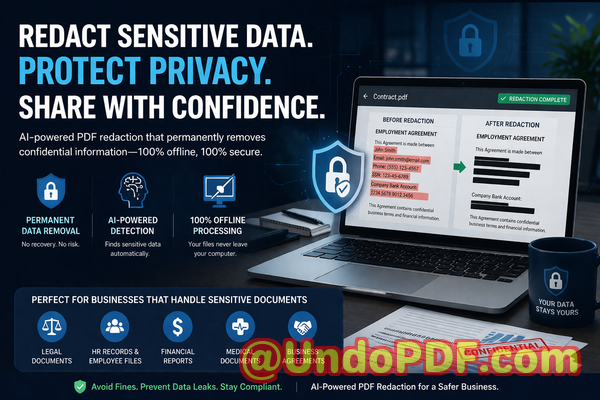
For professionals managing contracts, invoices, HR files, or any sensitive documents, finding a reliable solution to permanently remove confidential information is essential. That’s where AI-powered PDF redaction comes in, and today I want to share how VeryPDF’s AI PDF Redaction Tool Command Line can help your team securely handle sensitive data without risking privacy breaches.
In many organizations, sensitive information ends up in PDFs that are meant to be shared internally or externally. Here are some real business pain points I’ve observed:
-
Accidental exposure of sensitive data: Names, emails, social security numbers, financial information, or IDs often appear in invoices, contracts, or reports. If these PDFs are shared without proper redaction, businesses risk GDPR violations, HIPAA non-compliance, or internal policy breaches.
-
Manual redaction errors: Many teams rely on blacking out text in a PDF, assuming it’s enough. In reality, hidden text can sometimes be copied, extracted, or recovered by savvy usersleaving confidential data exposed.
-
Online redaction tools and privacy risks: Employees might be tempted to use free online PDF redactors. Uploading documents containing customer information to a third-party server introduces the risk of unauthorized access or accidental leaks.
Each of these situations represents a tangible risk with real consequences. Fines for GDPR violations can reach tens of thousands of euros, and leaked business secrets can erode client trust and harm your brand reputation.
This is where VeryPDF AI PDF Redaction Tool Command Line offers a practical solution. Unlike traditional redaction methods, it is designed to handle sensitive information with precision, security, and efficiency:
-
Automatic AI detection of sensitive data: The tool identifies personal identifiable information (PII), emails, phone numbers, financial data, IDs, and other confidential content automatically. You don’t need to search manually, reducing the risk of missing critical information.
-
Permanent removal, not just visual hiding: Once redacted, the data is irretrievably removed from the document. This eliminates the possibility of recovery by copy-pasting or using data extraction software.
-
Fully offline processing: Your files never leave your computer. There’s zero exposure to external servers, ensuring 100% privacy.
Imagine the difference in a practical scenario: you need to share a PDF invoice with a partner. With manual methods, you might black out customer names and amounts, but an enterprising user could extract that data. With VeryPDF AI PDF Redaction Tool Command Line, you can:
-
Load the PDF into the tool.
-
Let AI detect sensitive data automatically.
-
Review the selections to ensure accuracy.
-
Apply redaction.
-
Export a clean, secure PDF ready to share.
The benefits are immediate and visible:
-
Prevent accidental data leaks: Avoid sending confidential information to unintended recipients, protecting your company from fines and legal exposure.
-
Enhance internal compliance: Automated detection ensures your documents meet regulatory standards like GDPR, HIPAA, or industry-specific confidentiality requirements.
-
Eliminate reliance on risky online tools: Offline redaction keeps all sensitive information in-house, minimizing external risks.
I’ve seen this solution in action in real business scenarios:
-
A legal team avoided a potential GDPR violation by using AI-powered redaction to remove client names from case documents before sharing with external counsel.
-
A marketing department switched from free online PDF redactors to VeryPDF’s offline tool, eliminating the risk of confidential customer lists being uploaded to unknown servers.
-
A financial company successfully prevented sensitive financial figures from being accidentally sent to partners by fully automating the redaction process.
The tool is flexible and can be applied to any type of sensitive document:
-
Personal identifiable information (PII): Names, addresses, emails, phone numbers, social security numbers.
-
Financial data: Bank details, credit card numbers, transaction records.
-
Business secrets: Strategic plans, internal reports, client lists.
-
Legal or confidential clauses: Non-disclosure agreements, contracts, HR records.
By integrating AI-powered PDF redaction into your workflow, you remove human error, enforce compliance, and protect your company from preventable data leaks.
Here’s a quick step-by-step workflow I recommend for business teams:
-
Identify PDFs for redaction: Contracts, invoices, HR files, financial reports.
-
Load the PDF into VeryPDF AI PDF Redaction Tool Command Line.
-
AI automatically detects sensitive information: Review for accuracy.
-
Apply redaction: Data is permanently removed.
-
Export and share: Secure, clean PDFs ready for internal or external use.
This process is straightforward and scalable, making it ideal for teams of any size. Whether you handle five PDFs a week or hundreds, the tool ensures your sensitive information stays private.
From my perspective, the peace of mind is invaluable. Knowing that confidential data is permanently removed before sharing allows your team to focus on actual business work instead of worrying about potential exposure.
I highly recommend this to anyone who needs to share documents safely without risking data leaks or compliance issues.
Try it now and securely redact your PDFs: https://veryutils.com/smart-redact-server-ai-powered-pdf-redaction-software
Start your free trial today and ensure your sensitive data is permanently removed before sharing.
Frequently Asked Questions
-
How can I permanently remove sensitive data from a PDF instead of just hiding it?
VeryPDF AI PDF Redaction Tool Command Line ensures sensitive data is permanently deleted, not just visually hidden, so it cannot be recovered.
-
Can others recover redacted information from my PDF?
No. Once the AI applies redaction, the content is irretrievably removed, protecting your documents from unauthorized access.
-
Is it safe to use online PDF redaction tools?
Using online tools poses risks because your documents may be uploaded to third-party servers. Offline tools like VeryPDF eliminate that exposure.
-
Does this tool work completely offline?
Yes. All processing happens on your computer, ensuring full privacy and no data leaves your network.
-
What types of sensitive data can be automatically detected and removed?
Names, emails, phone numbers, social security numbers, bank details, business secrets, confidential clauses, and more.
-
How does this help with GDPR compliance?
By permanently removing personal data before sharing documents, you minimize the risk of accidental exposure and fines under GDPR.
-
Can I review the detected data before redaction?
Yes, the tool allows you to review AI-detected sensitive information before finalizing redaction.
-
Is this suitable for large batches of PDFs?
Absolutely. The command-line interface supports automated workflows for multiple files, saving time and ensuring consistency.
-
Will the tool affect the layout of my PDF?
No, it maintains the original layout and formatting while securely redacting confidential data.
-
Can I use it for contracts, HR files, and financial reports?
Yes, it’s ideal for any document containing sensitive or confidential information.
-
Do I need technical expertise to use the command-line tool?
Basic familiarity with command-line operations is sufficient, and comprehensive guides make setup straightforward for business users.
-
Can it detect hidden metadata or embedded information?
Yes, it can detect and remove hidden metadata, ensuring that no sensitive data is accidentally retained.
Tags/Keywords
redact sensitive data, remove confidential information, PDF redaction tool, protect privacy in PDFs, prevent data leaks, offline PDF redaction, secure document sharing, GDPR compliance, AI PDF redaction, permanent data removal
This approach ensures your business documents are safe to share, your compliance obligations are met, and your sensitive data is permanently protected. By integrating AI-powered redaction, you safeguard your company against human error and external risksturning a high-stakes problem into a manageable workflow.