How to Permanently Redact Sensitive Data from PDFs and Protect Business Privacy
Last month, we sent a financial report to a partner firm, only to realize later that several client names and account numbers were still visible. That one oversight could have led to a serious compliance violation and damaged trust with both clients and partners. For businesses handling sensitive information daily, this scenario isn’t rareit’s a ticking time bomb that can lead to fines, data breaches, and reputational damage.
Accidentally exposing sensitive data in PDFs is more common than you think. Many teams still rely on manual redaction, using black boxes or whiteouts in PDF editors. But unless the data is truly removed, it can be copied, recovered, or indexed by search tools. Worse, employees sometimes upload confidential documents to free online tools, unaware that these files may be stored on third-party servers.
This is where AI-powered PDF redaction becomes essential. VeryPDF AI PDF Redaction Tool Command Line lets businesses permanently remove confidential data while keeping documents fully offline. No more worrying about accidental leaks or regulatory finessensitive information is gone for good, and your team can share documents safely.
The Real Risks of PDF Data Exposure
Businesses face several tangible risks when sensitive information in PDFs isn’t properly handled:
-
Accidental exposure of personal or financial data: Client names, emails, phone numbers, account details, and employee information often end up in PDFs that are shared externally. If not redacted correctly, this could violate GDPR, HIPAA, or internal privacy policies.
-
Ineffective manual redaction: Simply highlighting text or overlaying black boxes doesn’t remove the underlying data. Attackers, competitors, or even accidental recipients can copy or recover confidential information.
-
Unsafe online tools: Employees may use free online redaction services for convenience. While seemingly harmless, these uploads risk storing sensitive files on unknown servers, creating a major compliance and security exposure.
These scenarios are more than theoreticalthey happen in real offices every day. One misstep can lead to legal action, fines, or loss of client trust.
How AI PDF Redaction Solves the Problem
VeryPDF AI PDF Redaction Tool Command Line is designed to tackle these risks head-on. Here’s how it addresses each challenge:
-
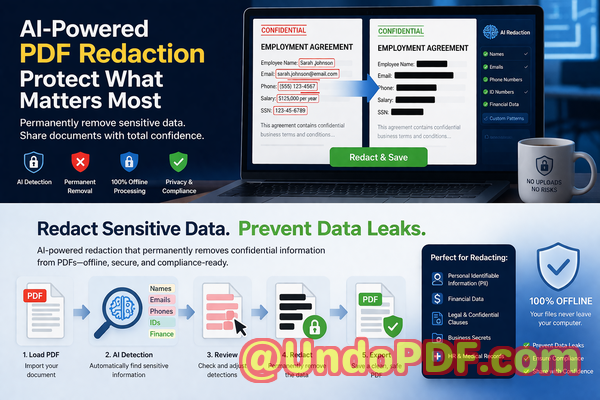
Automatic sensitive data detection: Using AI, the tool identifies names, emails, phone numbers, IDs, financial data, and other confidential content. You don’t need to manually search through dozens of pages.
-
Permanent removal, not just masking: Redacted data is completely erased, ensuring it cannot be copied, recovered, or reconstructed.
-
Offline processing for total privacy: Everything happens on your computer. No files are uploaded to the cloud, eliminating exposure risks from third-party services.
In practice, this means a legal team can safely share contracts, HR can distribute employee records, and finance teams can circulate reports without fear of leaks.
Real-Life Examples
-
Avoiding GDPR violations: A European consultancy was preparing a client report containing financial and personal data. By using VeryPDF AI PDF Redaction Tool, they automatically detected and permanently removed all sensitive information before sharing. This prevented a potential GDPR fine and safeguarded client trust.
-
Moving from online tools to offline security: A small accounting firm relied on free online PDF redactors. After switching to VeryPDF’s offline tool, they eliminated the risk of uploading confidential documents to third-party servers, significantly improving their data security posture.
-
Protecting sensitive business details: During a merger, a corporate legal team needed to share contracts containing trade secrets. Using AI-powered redaction, they removed confidential clauses while keeping the rest of the document intact, preventing sensitive business information from falling into competitor hands.
How to Redact PDFs Safely: Step-by-Step
Here’s a simple workflow you can adopt:
-
Load your PDF: Open the document in the VeryPDF AI PDF Redaction Tool.
-
Detect sensitive information: Let the AI automatically scan for PII, financial data, business secrets, and legal clauses.
-
Review suggested redactions: Confirm the AI’s selections to ensure nothing is missed.
-
Apply redaction: Permanently remove the sensitive data.
-
Export the clean PDF: Share with confidence, knowing all confidential information is erased.
Common types of sensitive data to redact include:
-
Personal identifiable information (PII): Names, addresses, emails, phone numbers, IDs
-
Financial data: Account numbers, transaction details, credit card numbers
-
Business secrets: Proprietary processes, trade secrets, internal strategy
-
Legal/confidential clauses: Contract terms, non-disclosure information, compliance notes
This approach not only protects sensitive information but also ensures your business stays compliant with data protection regulations.
Benefits Beyond Data Removal
-
Prevent fines and legal exposure: Proper redaction protects you from penalties under GDPR, HIPAA, or industry-specific regulations.
-
Stop accidental leaks: With sensitive information fully erased, the risk of accidental exposure is eliminated.
-
Secure document sharing: Offline processing ensures that confidential files never leave your network, keeping your business data safe from prying eyes.
-
Streamlined workflow: Automating detection and redaction saves time, reduces human error, and ensures consistency across all documents.
Practical Scenarios
-
HR Departments: Sharing employee contracts or medical leave records without exposing personal information.
-
Finance Teams: Circulating reports with client financial data without risking leaks.
-
Legal Teams: Redacting sensitive clauses in contracts, NDAs, or settlement agreements.
-
Business Development: Sharing proposals or strategy documents safely with external partners.
By applying AI redaction, these teams maintain operational efficiency while eliminating data risks.
Conclusion: Why Every Business Needs AI PDF Redaction
For any business handling sensitive documents, the consequences of a single mistake can be severe. I’ve seen firsthand how VeryPDF AI PDF Redaction Tool Command Line transforms document handling: reducing risk, ensuring compliance, and enabling secure sharing.
I highly recommend this to anyone who needs to share documents safely without risking data leaks or compliance issues. Try it now and securely redact your PDFs: https://veryutils.com/smart-redact-server-ai-powered-pdf-redaction-software
Start your free trial today and ensure your sensitive data is permanently removed before sharing.
Frequently Asked Questions
Q1: How can I permanently remove sensitive data from a PDF instead of just hiding it?
A1: The VeryPDF AI PDF Redaction Tool erases the data completely, ensuring it cannot be copied, recovered, or extracted.
Q2: Can others recover redacted information from my PDF?
A2: No. With AI-powered permanent removal, redacted content is fully erased, unlike manual black-box redactions.
Q3: Is it safe to use online PDF redaction tools?
A3: Online tools pose a risk because documents may be stored on third-party servers. Offline tools like VeryPDF keep all data local and secure.
Q4: Does this tool work completely offline?
A4: Yes, all redaction processes happen on your computer, ensuring 100% privacy.
Q5: What types of sensitive data can be automatically detected and removed?
A5: Personal information (names, emails, phone numbers, IDs), financial data, business secrets, and legal clauses.
Q6: How can I ensure compliance with GDPR when sharing documents?
A6: By permanently removing personal and financial data before sharing PDFs, your business avoids accidental exposure that could violate GDPR.
Q7: Can I review what the AI redacts before finalizing?
A7: Yes, the tool allows you to review suggested redactions for accuracy before applying them.
Q8: Does the tool handle multiple PDFs at once?
A8: Yes, batch processing lets you redact several documents simultaneously, saving time for busy teams.
Q9: Will redaction affect the formatting of my PDF?
A9: No, VeryPDF AI PDF Redaction preserves the original layout and content, removing only sensitive data.
Q10: Can this tool be used for legal, HR, and financial documents alike?
A10: Absolutely. Its AI detection covers a wide range of sensitive information types, making it suitable for multiple departments.
Q11: Is there a trial version available to test before purchasing?
A11: Yes, you can start a free trial to experience offline AI redaction and verify its effectiveness.
Keywords
redact sensitive data, remove confidential information, PDF redaction tool, protect privacy in PDFs, prevent data leaks, offline PDF redaction, secure document sharing, AI-powered redaction, compliance-friendly PDFs, permanently erase sensitive information