AI PDF Redaction That Prevents Data Leaks and Secures Confidential Documents
Protect your business from costly data leaks and compliance risks by using AI-powered PDF redaction that permanently removes sensitive information before sharing.
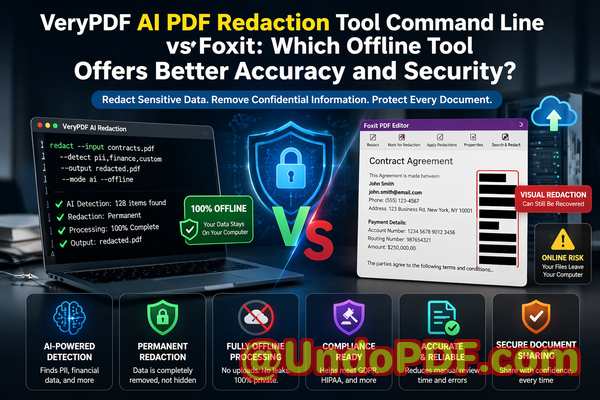
Last month, we sent a contract draft to a partner for review. Everything looked cleannames blacked out, financial figures hidden, signatures covered. Or so we thought. A few days later, they replied with a question that referenced information we believed had been removed. That’s when it hit us: the “redacted” data was still there, just visually hidden.
That moment was more than embarrassing. It exposed us to potential legal risks and raised serious concerns about how we handle confidential information. If you’ve ever shared PDFs with clients, vendors, or stakeholders, you’ve probably faced a similar uneasy feelingwondering if sensitive data is truly gone or just covered up.
In today’s environment, where regulations like GDPR impose strict requirements and data breaches can lead to massive fines and reputational damage, simply “hiding” information isn’t enough. Businesses need a reliable way to permanently remove confidential data, not just mask it.
The Hidden Risks of Poor PDF Redaction
Most organizations underestimate how easy it is for sensitive information to slip through the cracks. From my experience working with teams across legal, HR, and finance departments, the risks usually come down to a few recurring issues.
1. Sensitive Data Still Exists Beneath the Surface
One of the most common mistakes is assuming that blacking out text equals removing it. In reality, many traditional methods only overlay a black box on top of the content.
This means:
-
Text can still be copied and pasted
-
Hidden metadata may contain confidential details
-
Advanced users can recover the original content
Imagine sending a legal document thinking client names are hidden, only for someone to extract them with a simple copy-paste. That’s not just a technical flawit’s a compliance nightmare.
2. Manual Redaction Is Inconsistent and Error-Prone
Manual redaction sounds straightforward until you scale it.
In practice, it leads to:
-
Missed sensitive fields in long documents
-
Inconsistent formatting across teams
-
Human errors under time pressure
I’ve seen teams spend hours reviewing documents line by line, only to miss a single email address or ID number buried in the text. That one oversight can trigger serious consequences.
3. Online Tools Introduce Privacy Risks
Many professionals turn to free online PDF tools for convenience. But there’s a hidden trade-off:
-
Files are uploaded to third-party servers
-
You lose control over where data is stored
-
There’s no guarantee of deletion after processing
For industries handling confidential contracts, employee records, or financial data, this is a major red flag. Uploading sensitive documents to unknown servers can violate internal policies and external regulations.
Why Businesses Need a Smarter Approach to Redaction
After experiencing these challenges firsthand, it became clear that traditional methods simply don’t meet modern security requirements.
What businesses actually need is:
-
Automated detection of sensitive data
-
Permanent removalnot visual masking
-
Full control over data processing
-
Consistency across large volumes of documents
This is where an AI-driven solution changes everything.
How VeryPDF AI PDF Redaction Tool Solves Real Business Problems
When I started using VeryPDF AI PDF Redaction Tool Command Line, the difference was immediate. Instead of relying on manual effort or risky online tools, the entire process became structured, reliable, and secure.
Let me break down how it addresses the exact problems we faced.
AI-Powered Detection of Sensitive Information
The tool automatically identifies sensitive content such as:
-
Names and personal identifiers
-
Email addresses and phone numbers
-
Financial data and account details
-
ID numbers and confidential references
Instead of manually scanning hundreds of pages, the AI does the heavy lifting. This dramatically reduces the chance of human error.
Permanent Removal of Confidential Data
This is the most critical feature.
Unlike basic tools, this solution doesn’t just cover textit completely removes it from the document structure.
That means:
-
No recovery through copy-paste
-
No hidden layers or metadata leaks
-
No risk of accidental exposure
Once redacted, the data is gone for good.
Fully Offline Processing for Maximum Privacy
One of the biggest advantages is that everything runs locally.
-
No file uploads
-
No external servers
-
No data leaving your environment
For us, this was a game changer. It eliminated the anxiety around using online tools and ensured full compliance with internal data policies.
Real Business Scenarios Where This Makes a Difference
To make this more concrete, here are a few situations where this approach has proven invaluable.
Avoiding a GDPR Violation in Client Contracts
A colleague in a legal team shared how they nearly sent out contracts containing personal data of third parties.
Using AI-based redaction:
-
All personal identifiers were automatically detected
-
Sensitive sections were permanently removed
-
The final document was safe for external sharing
This prevented a potential compliance issue that could have resulted in fines and reputational damage.
Securing HR Documents Before Sharing
HR departments regularly handle:
-
Employee records
-
Salary information
-
Performance reviews
Before adopting an offline redaction tool, they relied on manual editing. Now:
-
Sensitive fields are automatically flagged
-
Redaction is consistent across all documents
-
Confidential employee data stays protected
Protecting Financial Reports from Data Leaks
Finance teams often need to share reports with external stakeholders while keeping certain figures confidential.
With AI redaction:
-
Specific financial data is removed permanently
-
Reports remain readable and professional
-
No risk of hidden data exposure
A Simple Workflow That Anyone Can Follow
One of the reasons this tool works so well in business environments is its straightforward process.
Here’s a typical workflow:
-
Load your PDF document
-
Run AI detection to identify sensitive data
-
Review flagged content for accuracy
-
Apply redaction to permanently remove data
-
Export the cleaned, secure PDF
This structured approach ensures nothing is overlooked while keeping the process efficient.
What Types of Data Should You Always Redact?
From experience, these are the most critical categories to focus on:
-
Personally identifiable information (PII)
-
Financial details and transaction data
-
Legal clauses and confidential agreements
-
Internal business strategies
-
Customer and client information
If a document is being shared externally, anything that could expose identity, financial status, or business strategy should be removed.
The Cost of Getting It Wrong
It’s easy to underestimate the impact of poor redaction until something goes wrong.
Potential consequences include:
-
Regulatory fines (especially under GDPR)
-
Legal disputes and liability
-
Loss of client trust
-
Damage to brand reputation
Even a single data leak can have long-term effects on a business.
That’s why investing in a reliable redaction process isn’t just a technical decisionit’s a strategic one.
Why Offline AI Redaction Is the Safer Choice
After comparing different approaches, the benefits of an offline AI-powered solution are clear:
-
Security: No external exposure of sensitive files
-
Accuracy: AI reduces human error
-
Compliance: Supports regulatory requirements
-
Efficiency: Saves time on manual review
-
Control: Full ownership of your data
For any organization handling confidential documents, these advantages are essential.
Final Thoughts and Recommendation
After dealing with the risks of manual redaction and the uncertainty of online tools, switching to an AI-powered, offline solution was one of the best decisions we made.
It transformed how we handle sensitive documents:
-
No more second-guessing whether data is truly removed
-
No more reliance on risky third-party platforms
-
No more costly mistakes from manual processes
I highly recommend this to anyone who needs to share documents safely without risking data leaks or compliance issues.
Try it now and securely redact your PDFs:
https://veryutils.com/smart-redact-server-ai-powered-pdf-redaction-software
Start your free trial today and ensure your sensitive data is permanently removed before sharing.
Frequently Asked Questions
1. How can I permanently remove sensitive data from a PDF instead of just hiding it?
You need a redaction tool that deletes the underlying content, not just overlays it. AI-powered tools ensure the data is completely removed from the file structure.
2. Can others recover redacted information from my PDF?
If you use basic methods, yes. But with proper redaction that permanently deletes data, recovery is not possible.
3. Is it safe to use online PDF redaction tools?
Online tools can expose your files to third-party servers, which may pose privacy and compliance risks.
4. Does this tool work completely offline?
Yes, it processes all documents locally, ensuring your data never leaves your environment.
5. What types of sensitive data can be automatically detected and removed?
Names, emails, phone numbers, financial data, ID numbers, and other personally identifiable information.
6. How can I ensure compliance with GDPR when sharing documents?
By permanently removing all personal data and using secure, offline processing methods.
7. Is manual redaction reliable for business use?
Manual redaction is prone to errors and inconsistencies, especially with large documents.
8. Can this tool handle large volumes of documents?
Yes, it’s designed for scalability and can process multiple files efficiently.
9. Does redaction affect the readability of the document?
No, it removes sensitive data while keeping the rest of the document intact and professional.
10. What industries benefit most from PDF redaction tools?
Legal, finance, healthcare, HR, and any industry handling confidential information.
11. How do I know if my current redaction method is secure?
Try copying and pasting redacted text. If it appears, your method is not secure.
Tags and Keywords
redact sensitive data, remove confidential information, PDF redaction tool, protect privacy in PDFs, prevent data leaks, offline PDF redaction, secure document sharing, AI PDF redaction, GDPR compliance, document security