Secure Your PDFs: AI-Powered Redaction to Permanently Remove Sensitive Data
Last month, we shared a PDF contract with a new partner, only to realize later that it still contained unredacted personal dataputting us at risk of a serious GDPR violation. The anxiety that followed was real: clients trust us to protect their information, legal teams stress about compliance, and one small oversight could have turned into a costly data breach. For any business handling sensitive documents, this scenario is all too familiar. The question is: how do you ensure every PDF you share is truly safe, without relying on manual processes that are prone to human error?
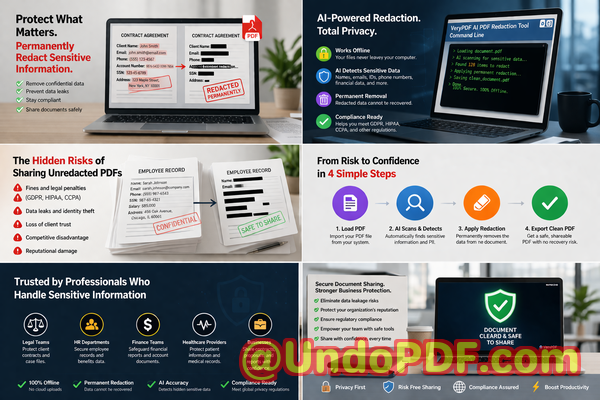
Many companies still underestimate the hidden dangers in document sharing. Even when redactions look correct on screen, the underlying data may still exist in the file, recoverable by anyone with the right tools. On top of that, employees often turn to online redaction tools for convenience, unknowingly exposing confidential files to third-party servers. These risks are not hypotheticalthey’re happening right now in offices across the globe, from legal firms to HR departments.
This is where AI-powered PDF redaction, especially fully offline solutions like VeryPDF AI PDF Redaction Tool Command Line, becomes a game-changer. It addresses real business pain points by automatically detecting sensitive information, permanently removing it, and keeping your documents safely on your own computer.
Imagine this: instead of manually blacking out names, email addresses, phone numbers, or financial data, you run your PDF through a smart tool that identifies every sensitive element and redacts it permanently. No accidental exposures, no uncertainty about whether the data can be recovered, and no risk of sending documents to a server you don’t control. For businesses that prioritize privacy, this is the only way to confidently share documents with clients, partners, or regulators.
One common scenario is HR departments sending employee reports or payroll PDFs. Even a single unredacted Social Security number can lead to serious identity theft risks and potential regulatory penalties. Legal teams handling contracts face similar dangers: confidential clauses or client information accidentally left visible can breach attorney-client confidentiality or trigger contractual liabilities. Financial institutions, meanwhile, risk compliance violations if account numbers or transaction details leak through poorly redacted statements.
Manual redaction methods are not only slow but unreliable. Highlighting text in black or covering it with shapes might look secure, but underlying text layers in PDFs often remain. Anyone with basic PDF tools can copy and paste the “hidden” information. Worse, employees using free online redaction tools often upload sensitive company data to unknown servers, risking exposure or misuse.
VeryPDF’s AI PDF Redaction Tool Command Line solves these problems with a straightforward workflow: load your PDF, let the AI detect sensitive data, review the suggested redactions, apply them, and export a clean, fully redacted PDF. Sensitive informationlike personally identifiable information (PII), financial records, legal clauses, and proprietary business secretsis permanently removed, not just visually hidden.
Because it works entirely offline, your documents never leave your local system. There’s no cloud storage, no third-party access, and no accidental data leaks. Your team can securely process PDFs knowing the information remains private and compliant with regulations like GDPR, HIPAA, and corporate confidentiality policies.
Consider a real-life example: a mid-sized legal firm previously relied on employees to manually redact contracts. One employee mistakenly left several client names visible, almost causing a breach of confidentiality. After switching to VeryPDF’s AI PDF Redaction Tool Command Line, the firm now automatically detects and removes all PII in seconds. No manual guesswork, no risk of incomplete redactions, and the team can confidently send documents externally without fear.
Another success story comes from a financial advisory company that shared investment reports with clients. Using an online redaction tool previously, sensitive account numbers were temporarily uploaded to a third-party server, raising privacy concerns. Switching to the offline AI solution not only eliminated this risk but also streamlined the workflow. Staff can now process multiple PDFs at once, automatically redacting client names, account details, and email addresses, while keeping all data local and secure.
Here’s a typical workflow for secure document redaction using the tool:
-
Load the PDF document into the software.
-
AI scans and identifies sensitive content, such as:
-
Personal identifiable information (names, emails, phone numbers, addresses)
-
Financial data (bank accounts, credit card numbers, transaction details)
-
Legal clauses or confidential business information
-
-
Review and confirm suggested redactions to ensure accuracy.
-
Apply redactions to permanently remove the sensitive information.
-
Export the fully redacted PDF, ready for secure sharing.
This process is efficient and foolproof. It removes the uncertainty of manual methods, prevents human errors, and ensures your company complies with strict privacy regulations.
The consequences of not redacting properly are serious. Data leaks can result in:
-
Hefty fines for GDPR, HIPAA, or other regulatory violations.
-
Loss of client trust and reputational damage.
-
Legal exposure for accidentally shared proprietary information.
-
Potential identity theft for individuals whose data was exposed.
Switching to an offline, AI-powered redaction tool mitigates all these risks. It allows you to maintain compliance while empowering teams to share documents confidently.
I highly recommend this to anyone who needs to share documents safely without risking data leaks or compliance issues. The peace of mind knowing every PDF is permanently cleansed of sensitive information is invaluable for legal teams, HR departments, financial institutions, and any business handling confidential data.
Try it now and securely redact your PDFs: https://veryutils.com/smart-redact-server-ai-powered-pdf-redaction-software
Start your free trial today and ensure your sensitive data is permanently removed before sharing.
Frequently Asked Questions
-
How can I permanently remove sensitive data from a PDF instead of just hiding it?
The tool uses AI to detect sensitive information and permanently removes it from the document, not just visually blacking it out.
-
Can others recover redacted information from my PDF?
No. Once applied, the redaction permanently deletes the sensitive content from the file.
-
Is it safe to use online PDF redaction tools?
Using online tools may expose confidential information to third-party servers, which is risky for compliance and privacy.
-
Does this tool work completely offline?
Yes, all processing occurs on your local computer. No files are uploaded to the cloud, ensuring full privacy.
-
What types of sensitive data can be automatically detected and removed?
AI can detect names, emails, phone numbers, addresses, financial details, legal clauses, business secrets, and other personally identifiable information.
-
How can I ensure compliance with GDPR when sharing documents?
By permanently removing personal data before sharing PDFs, you minimize the risk of accidental breaches and maintain GDPR compliance.
-
Can I process multiple PDFs at once?
Yes, batch processing is supported, making it efficient for HR, legal, and financial departments managing large volumes of documents.
-
Do I need technical expertise to use this tool?
No. The command-line interface is straightforward, and step-by-step guides make it accessible for non-technical users.
-
Will redaction affect the readability of non-sensitive content?
No. Only identified sensitive data is removed; all other content remains intact.
-
Can I review redactions before finalizing them?
Yes, the tool provides a review step to ensure accuracy before permanent removal.
-
What industries benefit most from this solution?
Legal, financial, HR, healthcare, consulting, and any business handling confidential documents benefit greatly.
Tags / Keywords
redact sensitive data, remove confidential information, PDF redaction tool, protect privacy in PDFs, prevent data leaks, offline PDF redaction, secure document sharing, GDPR compliance, AI PDF redaction, permanent data removal