Securely Redact PDFs Offline to Protect Sensitive Business Data and Ensure Compliance
Last month, we had a near-miss at my company. We needed to share a set of contracts with a partner, but later discovered the PDFs still contained unredacted personal datanames, emails, and even partial financial information. The thought of potential GDPR fines and reputational damage sent shivers down my spine. I knew we needed a reliable way to permanently remove sensitive information before any document left our office.
Accidental exposure of confidential data is more common than most business leaders realise. Whether it’s a legal contract, a financial report, or an HR file, a single overlooked field in a PDF can put a company at serious risk. I’ve seen teams struggle with manual redaction methods that only hide the text visually, leaving it recoverable. Others resort to online tools, unknowingly sending sensitive files to third-party serverseffectively handing over control of their own data.
This is exactly why I started using VeryPDF AI PDF Redaction Tool Command Line. It’s an offline solution that permanently removes sensitive data from PDFs, protecting privacy and ensuring compliance.
Real Business Pain Points That Put Companies at Risk
-
Accidental Exposure of Sensitive Data
Even simple documents like invoices or HR records often contain names, emails, phone numbers, and identification numbers. Sharing a PDF without proper redaction can easily violate GDPR or HIPAA, depending on your industry. One colleague of mine once shared a financial summary with an external partner, only to realise later that employees’ personal phone numbers were still visible. The potential fines and trust issues could have been catastrophic.
-
Ineffective Manual Redaction
Blackening out text with a PDF editor may look secure, but it’s often not permanent. Tools like Adobe Acrobat sometimes leave the underlying text intact, meaning it can be copied, extracted, or recovered. One of our legal teams experienced this firsthandsensitive clauses thought to be removed were later discovered during an internal audit.
-
Risks of Online Tools
Many employees use free online PDF redactors to save time, not realising that their documents are uploaded to external servers. For legal or medical documents, this is a serious privacy breach. Even if the service promises deletion, you can never be 100% sure.
How VeryPDF AI PDF Redaction Tool Solves These Problems
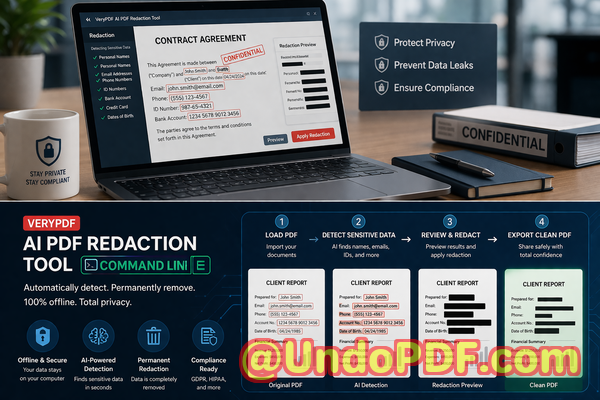
VeryPDF AI PDF Redaction Tool Command Line tackles these risks head-on. Here’s how it works:
-
AI-Powered Detection The tool automatically scans your PDFs to detect sensitive data such as personal identifiable information (PII), emails, phone numbers, financial records, and confidential clauses.
-
Permanent Redaction Unlike manual blackouts, it completely removes the underlying data from the file. Once applied, sensitive information cannot be recovered.
-
Fully Offline Operation All processing happens locally on your computer. No files are sent to external servers, guaranteeing 100% privacy and security.
Tangible Privacy and Security Benefits
Using this tool has transformed the way our team shares documents:
-
Prevent Accidental Leaks Every redacted PDF is safe to send externally, protecting against fines, lawsuits, and reputational damage.
-
Eliminate Third-Party Risks Offline processing ensures no sensitive documents leave your control.
-
Maintain Regulatory Compliance Whether GDPR, HIPAA, or internal corporate policies, you can confidently meet redaction standards without guesswork.
I recall a moment when a competitor requested a set of HR records for benchmarking. Using our previous online method could have risked exposure of personal employee data. With VeryPDF’s offline AI redaction, we confidently shared only the necessary informationcompletely stripped of sensitive identifiers.
Practical Workflow for Secure Redaction
Redacting PDFs doesn’t have to be complicated. Here’s a step-by-step example of how we handle sensitive documents now:
-
Load the PDF Open the file in the VeryPDF command line tool.
-
Detect Sensitive Data Run the AI detection to identify all names, emails, IDs, phone numbers, financial figures, and confidential clauses.
-
Review Confirm that all detected items are correct and mark any additional items manually if needed.
-
Apply Redaction Execute the redaction process. The tool permanently removes the data from the PDF.
-
Export Clean PDF Save the redacted file ready for secure sharing.
Common types of data to redact:
-
Personal identifiable information (PII)
-
Financial data (bank accounts, invoices, payroll information)
-
Business secrets and internal strategies
-
Legal or confidential clauses in contracts
Real-Life Example of Risk Mitigation
A legal firm I consult for recently avoided a compliance violation thanks to this tool. They needed to share hundreds of contracts containing client names, addresses, and payment details with an external auditor. Using VeryPDF’s AI redaction offline, they ensured that every PDF was stripped of sensitive identifiers before sharingcompletely mitigating any risk of exposure.
Switching from online tools to an offline solution also improved data security dramatically. Employees no longer had to worry about uploading documents to unknown servers, which used to be a daily stress point in the office.
Why Offline AI Redaction is Essential for Businesses
Many companies underestimate the risk of sensitive data leakage. In industries like legal, healthcare, or finance, even a minor breach can result in costly fines, regulatory scrutiny, and lost client trust. Offline AI redaction provides an extra layer of protection:
-
No accidental uploads to external servers
-
Permanent removal of sensitive content
-
Confidence in compliance with privacy regulations
I often tell managers and compliance officers: “It’s not just about redacting a document; it’s about protecting your business from preventable risks.”
Conclusion
VeryPDF AI PDF Redaction Tool Command Line has become an essential part of our document management process. It addresses real business pain points: accidental data exposure, ineffective manual redactions, and unsafe online tools.
I highly recommend this to anyone who needs to share documents safely without risking data leaks or compliance issues. The combination of AI-powered detection, permanent offline redaction, and complete privacy control makes it a must-have for modern businesses.
Try it now and securely redact your PDFs: https://veryutils.com/smart-redact-server-ai-powered-pdf-redaction-software
Start your free trial today and ensure your sensitive data is permanently removed before sharing.
Frequently Asked Questions
Q: How can I permanently remove sensitive data from a PDF instead of just hiding it?
A: VeryPDF AI PDF Redaction Tool Command Line removes the underlying data entirely, so it cannot be recovered.
Q: Can others recover redacted information from my PDF?
A: No. Once redaction is applied, all sensitive data is permanently removed from the file.
Q: Is it safe to use online PDF redaction tools?
A: Online tools pose a risk because your files are uploaded to third-party servers, which could lead to accidental data exposure.
Q: Does this tool work completely offline?
A: Yes, all processing happens locally on your computer. Your sensitive documents never leave your device.
Q: What types of sensitive data can be automatically detected and removed?
A: Personal identifiable information, financial data, phone numbers, emails, business secrets, and legal clauses can all be detected.
Q: How can I ensure compliance with GDPR when sharing documents?
A: By using AI-powered redaction to permanently remove sensitive information before sharing, you can meet GDPR standards effectively.
Q: Can this tool handle large volumes of PDFs?
A: Yes, the command line interface is designed for batch processing, making it ideal for companies that need to redact multiple files efficiently.
Q: How accurate is the AI detection?
A: The AI is trained to recognise a wide range of sensitive information types, reducing the chance of human error during redaction.
Q: Is it suitable for legal and medical documents?
A: Absolutely. It supports sensitive data in any sector, including healthcare, legal, finance, and HR.
Q: What is the workflow for redacting a document?
A: Load the PDF detect sensitive data review apply redaction export clean PDF.
Q: Can I manually adjust redactions if needed?
A: Yes, the tool allows for manual review and adjustments to ensure complete accuracy before exporting.
Tags / Keywords
redact sensitive data, remove confidential information, PDF redaction tool, protect privacy in PDFs, prevent data leaks, offline PDF redaction, secure document sharing, AI-powered PDF redaction, GDPR compliance, HIPAA compliance