Sharing PDFs Safely: How to Permanently Remove Sensitive Data Before Sharing
Last month, we sent a PDF contract to a partner and only later realized it still contained unredacted personal data, including client emails and employee identifiers. The moment we noticed, my heart sankthis could have triggered a GDPR violation, exposed our company to legal risks, or damaged client trust. Many businesses face similar situations without even realizing it. A simple oversight in document redaction can lead to serious consequences, from regulatory fines to leaked business secrets.
One of the biggest challenges is that redaction isn’t as straightforward as it seems. Highlighting text in black or using online “redact” tools might appear secure, but these methods often leave sensitive information recoverable. Worse, uploading confidential files to an external service can itself create a data breach. For companies handling contracts, HR records, financial statements, or client reports, the risks are tangible and immediate.
Manual redaction mistakes are more common than most businesses think. Imagine an HR manager preparing termination letters. They manually black out Social Security numbers and salaries, confident the information is gone. Later, a savvy recipient copies the text or opens it in a PDF editor, revealing everything. These slip-ups not only breach confidentiality but also put companies on the radar of auditors and regulators.
Employees frequently use free online tools to remove sensitive data, thinking it’s a quick fix. However, these tools often process files on third-party servers, meaning confidential client information, internal financials, or legal agreements could be stored or intercepted. The consequences? Data leaks, compliance violations, and potential lawsuits.
This is where VeryPDF AI PDF Redaction Tool Command Line comes in. Unlike traditional methods, this tool provides a robust, automated, and completely offline solution to permanently remove confidential information from PDFs.
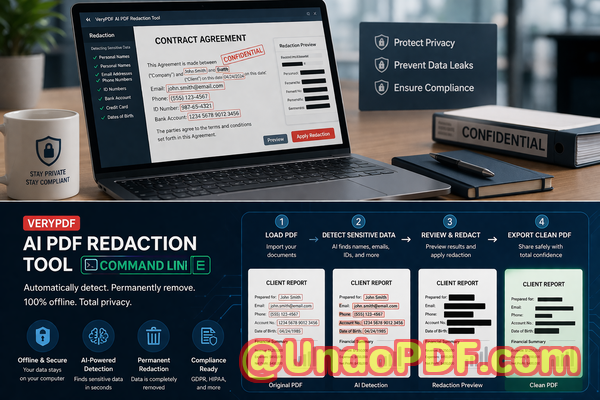
The AI engine detects sensitive data automaticallynames, emails, phone numbers, IDs, financial details, and even legal clausesensuring nothing is overlooked. Redaction isn’t just visual; it’s permanent. Once applied, the information is irretrievably removed, eliminating the risk of accidental exposure. Since all processing occurs offline, documents never leave your local machine, ensuring full privacy and compliance with data protection laws like GDPR.
For example, a mid-sized consultancy was about to share a quarterly report with a partner. Using traditional redaction, they missed a few embedded client emails. With VeryPDF AI PDF Redaction Tool Command Line, the software scanned the entire document, highlighted sensitive entries, and allowed the team to review and redact automatically. The result? A clean, secure PDF ready for sharing without fear of leaking personal or proprietary data.
Switching from online tools to an offline solution also reduces risk. Another client had previously relied on free web-based redaction, inadvertently uploading dozens of confidential contracts. Once they adopted the offline AI-powered tool, every redaction process stayed local, ensuring complete control over sensitive content. This step alone prevented multiple potential compliance issues and gave the legal team peace of mind.
Implementing a secure workflow is simple and practical:
-
Load your PDF document into the VeryPDF AI PDF Redaction Tool.
-
The AI scans for sensitive data automatically.
-
Review flagged items to confirm redaction.
-
Apply the redaction to permanently remove all confidential content.
-
Export the clean PDF for secure sharing.
Common types of data businesses should consider redacting include:
-
Personal Identifiable Information (PII): Names, addresses, emails, phone numbers, social security or tax IDs.
-
Financial data: Bank account numbers, invoices, transaction records.
-
Business secrets: Strategic plans, client lists, trade secrets.
-
Legal or confidential clauses: Contract terms, employee agreements, NDAs.
Real business scenarios highlight the importance of this tool. One law firm avoided a GDPR fine after a junior associate accidentally left client email addresses in a shared case summary. Another financial services company ensured internal audit reports didn’t leak sensitive transaction details when sharing with external consultants. In both cases, the AI PDF redaction workflow made secure document sharing simple, reliable, and compliant.
For busy managers or compliance officers, the practical benefits are clear:
-
Eliminate human error in manual redaction.
-
Avoid accidental data exposure through online tools.
-
Ensure regulatory compliance effortlessly.
-
Maintain client trust by protecting sensitive information.
-
Save time with automated AI detection and redaction.
I highly recommend this tool to anyone who regularly shares documents containing confidential data. It’s straightforward to use, powerful, and gives real peace of mind.
Try it now and securely redact your PDFs: https://veryutils.com/smart-redact-server-ai-powered-pdf-redaction-software
Start your free trial today and ensure your sensitive data is permanently removed before sharing.
FAQs
1. How can I permanently remove sensitive data from a PDF instead of just hiding it?
The VeryPDF AI PDF Redaction Tool Command Line permanently deletes sensitive information rather than just masking it visually, making it unrecoverable.
2. Can others recover redacted information from my PDF?
No. Once the AI redaction is applied, all sensitive content is irretrievably removed. Copying, extracting, or reopening the document will not reveal it.
3. Is it safe to use online PDF redaction tools?
Not always. Online tools often upload your document to third-party servers, potentially exposing sensitive data. Offline AI redaction avoids this risk.
4. Does this tool work completely offline?
Yes. All detection and redaction processes happen on your local machine, ensuring 100% privacy.
5. What types of sensitive data can be automatically detected and removed?
The AI identifies PII, financial information, phone numbers, emails, IDs, legal clauses, and business secrets.
6. How can I ensure compliance with GDPR when sharing documents?
By permanently redacting personal data and keeping all processing offline, you reduce the risk of data breaches and meet GDPR requirements.
7. Can I review the redacted content before finalizing?
Yes. The workflow allows you to review flagged items before applying permanent redaction.
8. How fast is the redaction process?
AI-powered detection is quick and efficient, capable of scanning large documents in minutes depending on size.
9. Can I integrate this into existing workflows?
Yes. The command line tool allows automation and integration into document management systems.
10. Does it support multiple PDF types and formats?
Yes. The tool works with standard PDFs, including those with embedded images or complex layouts.
11. What happens if I accidentally miss a sensitive item?
The AI scans the entire document thoroughly, minimizing the chance of missing sensitive information. You can also review flagged items before final redaction.
12. Is training required to use the tool?
No. The tool is user-friendly with a simple workflow: load, scan, review, redact, and export.
Tags/Keywords
redact sensitive data, remove confidential information, PDF redaction tool, protect privacy in PDFs, prevent data leaks, offline PDF redaction, secure document sharing, GDPR compliance, AI-powered redaction, permanent PDF redaction