UndoPDF

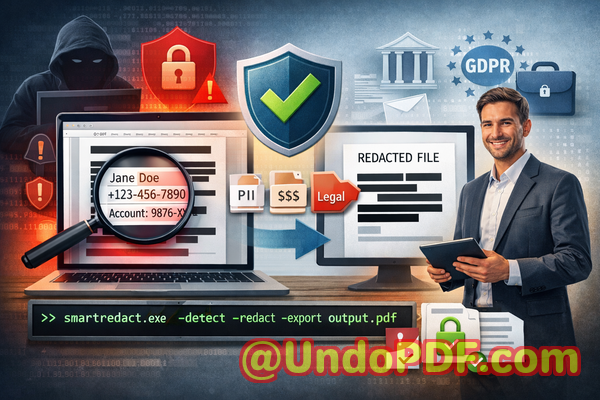
Sharing documents externally without redaction exposes sensitive data. Smart Redact Server ensures all confidential information is permanently removed before sharing

Sharing PDFs Safely: How to Permanently Remove Sensitive Data Before Sharing

Last month, we sent a PDF contract to a partner and only later realized it still contained unredacted personal data, including client emails and employee identifiers. The moment we noticed, my heart sankthis could have triggered a GDPR violation, exposed our company to legal risks, or damaged client trust. Many businesses face similar situations without even realizing it. A simple oversight in document redaction can lead to serious consequences, from regulatory fines to leaked business secrets.
Sharing documents externally without redaction exposes sensitive data Smart Redact Server ensures all confidential info

One of the biggest challenges is that redaction isn’t as straightforward as it seems. Highlighting text in black or using online “redact” tools might appear secure, but these methods often leave sensitive information recoverable. Worse, uploading confidential files to an external service can itself create a data breach. For companies handling contracts, HR records, financial statements, or client reports, the risks are tangible and immediate.

Manual redaction mistakes are more common than most businesses think. Imagine an HR manager preparing termination letters. They manually black out Social Security numbers and salaries, confident the information is gone. Later, a savvy recipient copies the text or opens it in a PDF editor, revealing everything. These slip-ups not only breach confidentiality but also put companies on the radar of auditors and regulators.

Employees frequently use free online tools to remove sensitive data, thinking it’s a quick fix. However, these tools often process files on third-party servers, meaning confidential client information, internal financials, or legal agreements could be stored or intercepted. The consequences? Data leaks, compliance violations, and potential lawsuits.

This is where VeryPDF AI PDF Redaction Tool Command Line comes in. Unlike traditional methods, this tool provides a robust, automated, and completely offline solution to permanently remove confidential information from PDFs.

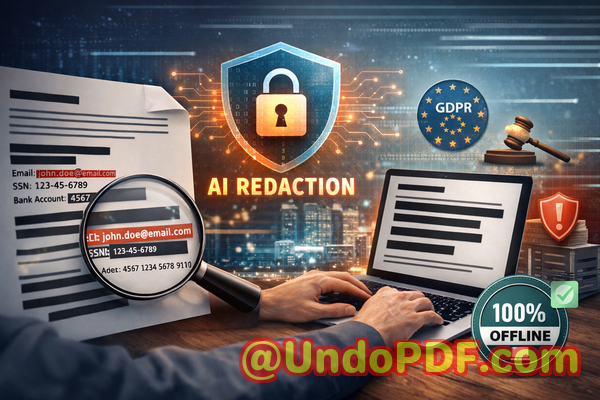
The AI engine detects sensitive data automaticallynames, emails, phone numbers, IDs, financial details, and even legal clausesensuring nothing is overlooked. Redaction isn’t just visual; it’s permanent. Once applied, the information is irretrievably removed, eliminating the risk of accidental exposure. Since all processing occurs offline, documents never leave your local machine, ensuring full privacy and compliance with data protection laws like GDPR.

For example, a mid-sized consultancy was about to share a quarterly report with a partner. Using traditional redaction, they missed a few embedded client emails. With VeryPDF AI PDF Redaction Tool Command Line, the software scanned the entire document, highlighted sensitive entries, and allowed the team to review and redact automatically. The result? A clean, secure PDF ready for sharing without fear of leaking personal or proprietary data.

Switching from online tools to an offline solution also reduces risk. Another client had previously relied on free web-based redaction, inadvertently uploading dozens of confidential contracts. Once they adopted the offline AI-powered tool, every redaction process stayed local, ensuring complete control over sensitive content. This step alone prevented multiple potential compliance issues and gave the legal team peace of mind.

Implementing a secure workflow is simple and practical:

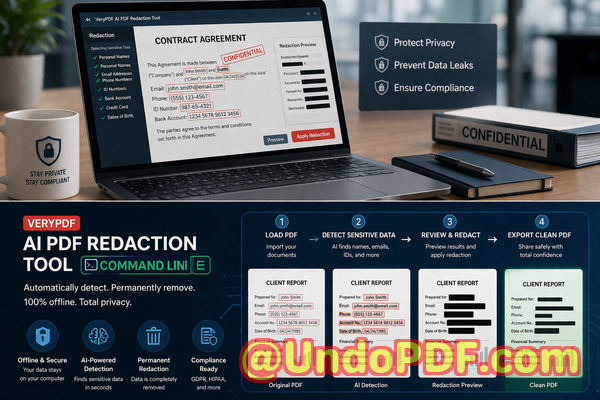
  • Load your PDF document into the VeryPDF AI PDF Redaction Tool.

  • The AI scans for sensitive data automatically.

  • Review flagged items to confirm redaction.

  • Apply the redaction to permanently remove all confidential content.

  • Export the clean PDF for secure sharing.

Common types of data businesses should consider redacting include:

  • Personal Identifiable Information (PII): Names, addresses, emails, phone numbers, social security or tax IDs.

  • Financial data: Bank account numbers, invoices, transaction records.

  • Business secrets: Strategic plans, client lists, trade secrets.

  • Legal or confidential clauses: Contract terms, employee agreements, NDAs.

Real business scenarios highlight the importance of this tool. One law firm avoided a GDPR fine after a junior associate accidentally left client email addresses in a shared case summary. Another financial services company ensured internal audit reports didn’t leak sensitive transaction details when sharing with external consultants. In both cases, the AI PDF redaction workflow made secure document sharing simple, reliable, and compliant.

For busy managers or compliance officers, the practical benefits are clear:

  • Eliminate human error in manual redaction.

  • Avoid accidental data exposure through online tools.

  • Ensure regulatory compliance effortlessly.

  • Maintain client trust by protecting sensitive information.

  • Save time with automated AI detection and redaction.

I highly recommend this tool to anyone who regularly shares documents containing confidential data. It’s straightforward to use, powerful, and gives real peace of mind.

Try it now and securely redact your PDFs: https://veryutils.com/smart-redact-server-ai-powered-pdf-redaction-software

Start your free trial today and ensure your sensitive data is permanently removed before sharing.

FAQs

1. How can I permanently remove sensitive data from a PDF instead of just hiding it?

The VeryPDF AI PDF Redaction Tool Command Line permanently deletes sensitive information rather than just masking it visually, making it unrecoverable.

2. Can others recover redacted information from my PDF?

No. Once the AI redaction is applied, all sensitive content is irretrievably removed. Copying, extracting, or reopening the document will not reveal it.

3. Is it safe to use online PDF redaction tools?

Not always. Online tools often upload your document to third-party servers, potentially exposing sensitive data. Offline AI redaction avoids this risk.

4. Does this tool work completely offline?

Yes. All detection and redaction processes happen on your local machine, ensuring 100% privacy.

5. What types of sensitive data can be automatically detected and removed?

The AI identifies PII, financial information, phone numbers, emails, IDs, legal clauses, and business secrets.

6. How can I ensure compliance with GDPR when sharing documents?

By permanently redacting personal data and keeping all processing offline, you reduce the risk of data breaches and meet GDPR requirements.

7. Can I review the redacted content before finalizing?

Yes. The workflow allows you to review flagged items before applying permanent redaction.

8. How fast is the redaction process?

AI-powered detection is quick and efficient, capable of scanning large documents in minutes depending on size.

9. Can I integrate this into existing workflows?

Yes. The command line tool allows automation and integration into document management systems.

10. Does it support multiple PDF types and formats?

Yes. The tool works with standard PDFs, including those with embedded images or complex layouts.

11. What happens if I accidentally miss a sensitive item?

The AI scans the entire document thoroughly, minimizing the chance of missing sensitive information. You can also review flagged items before final redaction.

12. Is training required to use the tool?

No. The tool is user-friendly with a simple workflow: load, scan, review, redact, and export.

Tags/Keywords

redact sensitive data, remove confidential information, PDF redaction tool, protect privacy in PDFs, prevent data leaks, offline PDF redaction, secure document sharing, GDPR compliance, AI-powered redaction, permanent PDF redaction
UndoPDF

Cloud-based redaction tools expose PDFs to potential breaches. VeryPDF operates fully offline, ensuring sensitive information remains secure

Secure Your PDFs: Permanently Remove Sensitive Data Offline to Prevent Leaks

Last month, our legal team shared a contract with a new partner. We were confident everything was in orderuntil we realized the PDF still contained unredacted personal emails and employee IDs. The thought of a potential GDPR violation kept me up at night. Mistakes like this aren’t rare. In fact, many businesses unknowingly expose sensitive information every day simply because redaction wasn’t handled properly.

Cloud-based redaction tools expose PDFs to potential breaches VeryPDF operates fully offline, ensuring sensitive inform

Accidentally sharing confidential data isn’t just embarrassingit carries real consequences. Fines, legal disputes, lost client trust, and compliance headaches can all stem from a single oversight. That’s why finding a reliable solution to permanently remove sensitive information from PDFs is critical.

One of the biggest challenges businesses face is manual redaction. Simply blacking out text or pasting over confidential details looks secure, but in reality, the data is often still recoverable. Even worse, employees frequently turn to free online tools to redact documents, unknowingly sending sensitive company files to third-party servers. In both cases, the risk of data leaks skyrockets.

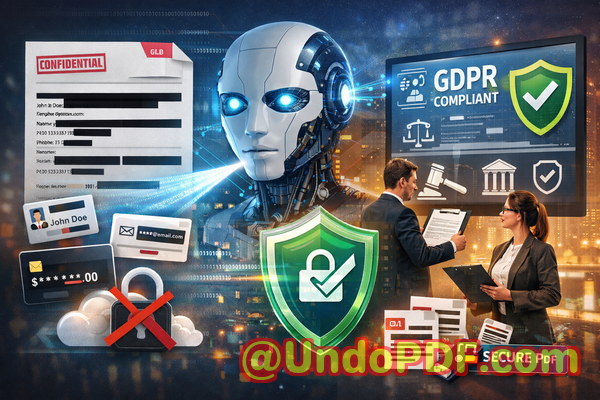
This is where the VeryPDF AI PDF Redaction Tool Command Line comes in. Unlike online solutions, it works fully offline, so documents never leave your secure environment. Using AI, it can automatically detect and redact sensitive information such as names, emails, phone numbers, IDs, financial data, and other confidential contentpermanently removing it, not just hiding it visually.

Imagine preparing an HR report with hundreds of employee records. Manually redacting personal information could take hours, with a constant worry that something might slip through. With VeryPDF’s AI tool, the process is streamlined: load your PDF, let AI detect sensitive data, review the suggested redactions, apply them, and export a clean, safe document ready to share. It’s that simple.

The benefits are tangible. Offline processing ensures that sensitive documents never get uploaded to external servers, eliminating a major source of accidental leaks. Compliance becomes easier: you can confidently share contracts, financial reports, HR records, or legal agreements, knowing that all confidential data has been permanently removed. And in the rare case of an audit or data request, you can prove that sensitive information was properly protected.

I recall one instance with a mid-sized consulting firm. They needed to share client contracts with a third-party reviewer but wanted to remove client-specific financial terms. Using traditional methods, they risked exposure or mistakes. Switching to VeryPDF AI PDF Redaction Tool Command Line allowed them to automate redaction completely offline. The contracts were safely shared, and the firm avoided potential compliance violations. Moments like these demonstrate how crucial a secure, reliable redaction process is.

Common scenarios where the tool shines include:

  • Legal Documents: Redact client names, sensitive clauses, and case information before sharing with external parties.

  • HR Records: Protect employee personal information such as social security numbers, emails, and payroll data.

  • Financial Reports: Remove account numbers, client-specific financial details, and internal projections.

  • Medical Records: Safeguard patient identifiers while sharing anonymized reports for audits or research.

Here’s a practical workflow that makes the process clear:

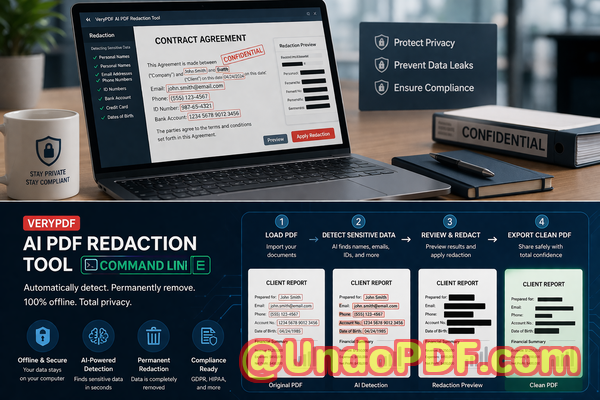
  1. Load the PDF into the AI PDF Redaction Tool.

  2. Detect sensitive data automaticallyAI identifies personal, financial, and confidential business information.

  3. Review suggested redactions to ensure no critical details are missed.

  4. Apply permanent redactionsdata is completely removed, not just hidden.

  5. Export the cleaned PDF ready to share safely.

The types of sensitive data commonly protected include:

  • Personal identifiable information (PII)

  • Financial data and account details

  • Business secrets or strategic information

  • Legal clauses and confidential agreements

  • Any data flagged as sensitive by internal compliance policies

Using the AI tool doesn’t just save timeit prevents serious mistakes. I’ve seen businesses recover from risky situations simply because they switched to an offline, automated redaction solution. For example, one marketing agency almost shared a proposal containing client revenue projections. With manual checks, the sensitive numbers might have slipped through. By using VeryPDF’s AI tool offline, the proposal was safely shared without exposing confidential client data.

Even for small teams, the impact is significant. Employees no longer have to juggle complicated manual redaction or risk uploading sensitive documents to untrusted online tools. Everything stays within the company’s secure environment, giving managers peace of mind.

Compliance officers also appreciate the clarity the tool provides. GDPR, HIPAA, and other data protection regulations require demonstrable measures to protect personal and sensitive information. The AI PDF Redaction Tool allows teams to not only redact confidential data but also maintain an audit trail of the redaction process, proving due diligence in protecting privacy.

When it comes to document security, prevention is always better than reacting to a leak. Whether you’re sharing contracts, HR records, client proposals, or internal financial reports, ensuring that sensitive information is permanently removed before distribution is critical.

I highly recommend this to anyone who needs to share documents safely without risking data leaks or compliance issues. Try it now and securely redact your PDFs: https://veryutils.com/smart-redact-server-ai-powered-pdf-redaction-software. Start your free trial today and ensure your sensitive data is permanently removed before sharing.

Frequently Asked Questions

Q: How can I permanently remove sensitive data from a PDF instead of just hiding it?

A: VeryPDF AI PDF Redaction Tool Command Line permanently removes sensitive data, not just visually obscuring it. Once redacted, the data cannot be recovered.

Q: Can others recover redacted information from my PDF?

A: No. The tool removes the underlying text and metadata, ensuring redacted information cannot be retrieved.

Q: Is it safe to use online PDF redaction tools?

A: Using online tools can be risky since files are uploaded to external servers. Sensitive data may be exposed. Offline tools like VeryPDF ensure 100% privacy.

Q: Does this tool work completely offline?

A: Yes. All processing happens on your computer, ensuring documents never leave your secure environment.

Q: What types of sensitive data can be automatically detected and removed?

A: AI automatically detects PII, emails, phone numbers, IDs, financial details, business secrets, and legal clauses.

Q: Can I use this tool for legal compliance, like GDPR?

A: Absolutely. The tool helps meet GDPR and other data protection regulations by permanently removing confidential data before sharing.

Q: How long does it take to redact a document?

A: Processing speed depends on the document size, but the AI tool automates detection and redaction, saving hours compared to manual methods.

Q: Can I review suggested redactions before applying them?

A: Yes. The tool provides a review step, giving you full control over what gets redacted.

Q: Does it handle multiple PDF documents at once?

A: Yes, batch processing is supported, which is especially useful for large projects or ongoing compliance tasks.

Q: Is technical knowledge required to use the command line tool?

A: No. The tool is user-friendly with clear commands and guidance suitable for business professionals.

Q: Can I use it for sensitive HR records and financial reports?

A: Yes. It is ideal for HR, legal, finance, medical, and other sensitive documents requiring permanent redaction.

Tags / Keywords:

redact sensitive data, remove confidential information, PDF redaction tool, protect privacy in PDFs, prevent data leaks, offline PDF redaction, secure document sharing, AI PDF redaction, GDPR compliance, permanent data removal

UndoPDF

Best Secure PDF Redaction Software for Organizations That Cannot Use Cloud Based Solutions Due to Compliance Rules

Protect Sensitive Data in PDFs Without Risk: AI-Powered Offline Redaction for Businesses

Last month, our team shared a PDF containing client contracts with a partner. We later realized it still included unredacted personal informationemails, phone numbers, and even social security numbers. The panic set in: a potential GDPR violation and reputational damage loomed over us. This is a scenario many businesses face but rarely discuss openly. Sharing documents safely without exposing confidential information is a challengeespecially for companies bound by strict compliance rules or operating in sectors like legal, HR, or finance.

Best Secure PDF Redaction Software for Organizations That Cannot Use Cloud Based Solutions Due to Compliance Rules

Accidental data leaks in PDFs are more common than you think. Many organizations still rely on manual redactionhighlighting or blacking out textonly to discover later that the information can be copied, recovered, or viewed in document metadata. Other teams turn to online PDF tools, unaware that uploading sensitive documents to third-party servers creates a major privacy risk.

This is where VeryPDF AI PDF Redaction Tool Command Line comes in. Designed for organizations that cannot risk cloud-based processing, it ensures sensitive data is permanently removed from PDFs before sharing, keeping confidential information fully private and secure.


The Hidden Risks of Sharing PDFs in Business

In today’s fast-paced work environment, sharing documents is unavoidable. Yet, without proper safeguards, PDFs become a silent source of data breaches. Consider these real-life pain points:

  • Sensitive information left exposed: HR teams often share employee records or contracts containing names, emails, phone numbers, salary details, or even government IDs. If a PDF is shared with the wrong recipient or left unsecured, it can trigger serious compliance violations.

  • Manual redaction errors: Many employees “black out” sensitive sections using annotation tools. However, the data often remains embedded in the document, invisible but fully recoverable. This gives a false sense of security.

  • Unintentional online exposure: Teams may use free online PDF editors or redaction tools without realizing that uploading files transfers confidential data to external servers. The consequences? Possible leaks to competitors, hackers, or unverified third parties.

Each of these scenarios carries tangible risks: GDPR fines, legal liabilities, brand damage, and loss of client trust.


How AI-Powered PDF Redaction Solves These Issues

VeryPDF AI PDF Redaction Tool Command Line addresses these business risks with precision. Here’s how it works:

  • Automatic detection of sensitive data: The tool scans documents for personal identifiable information (PII), financial data, legal clauses, and business secrets. No need to hunt for hidden data manually.

  • Permanent removal, not just hiding: Unlike manual redaction, the AI ensures confidential information is completely erased from the PDF. Once redacted, there’s no way for others to recover it.

  • Fully offline processing: All files stay on your local machine. This eliminates the risk of exposing documents to cloud servers or third-party vendors.


Real Business Scenarios Demonstrating the Impact

  1. Preventing GDPR violations: A mid-sized HR firm avoided potential fines when preparing employee evaluations for external auditing. By using the offline AI redaction tool, they ensured that all PII was permanently removed before sharing PDFs with auditors.

  2. Protecting client contracts: A legal team dealing with sensitive merger documents switched from free online redaction tools to VeryPDF’s offline solution. They no longer worry about confidential data being uploaded to the internet.

  3. Safeguarding internal reports: A finance department used the AI redaction tool to remove client financial data from reports before sending them to an external consultant, eliminating the risk of accidental leaks.


Practical Workflow for Secure PDF Sharing

Implementing AI-powered redaction is straightforward. A typical workflow looks like this:

  1. Load your PDF Open the document in the command line tool.

  2. Detect sensitive data Let the AI automatically scan for PII, financial data, or confidential clauses.

  3. Review detected content Confirm the sections that need redaction.

  4. Apply redaction Permanently remove sensitive information.

  5. Export a clean PDF Share the document safely with colleagues, clients, or partners.

Common Types of Data to Redact:

  • Personal identifiable information (PII) such as names, addresses, emails, phone numbers, or social security numbers

  • Financial data including account numbers, invoices, or transaction details

  • Business secrets like product designs, strategies, or proprietary calculations

  • Legal or confidential clauses in contracts, NDAs, or corporate agreements

This step-by-step approach not only prevents accidental leaks but also ensures compliance with privacy regulations like GDPR.


Benefits of Using VeryPDF AI PDF Redaction Tool Command Line

  • No risk of data leaving your device: Entirely offline operation protects privacy.

  • Permanent removal of sensitive content: Redacted data cannot be copied or recovered.

  • Compliance assurance: Supports GDPR, HIPAA, and other privacy regulations.

  • Time-saving automation: AI detects sensitive information faster than manual review.

  • Versatility: Works for legal, HR, finance, medical, and corporate documents.


Real-Life Example: How It Saved a Business

One consulting firm faced a high-risk situation. Their client contracts contained detailed personal and financial information. Previously, they relied on a manual redaction process, which was error-prone. By adopting VeryPDF AI PDF Redaction Tool Command Line, they were able to:

  • Identify hidden PII across hundreds of documents in minutes

  • Permanently remove sensitive information before sharing with partners

  • Avoid the risk of regulatory fines or reputational damage

The result? A faster, safer, and fully compliant document-sharing process.


Conclusion: Protect Your Documents Without Compromise

For any business handling sensitive PDFs, the risks of accidental exposure are real and potentially costly. I highly recommend VeryPDF AI PDF Redaction Tool Command Line to anyone who needs to share documents safely without risking data leaks or compliance issues. It automates the redaction process, ensures sensitive information is permanently removed, and keeps all files offline and secure.

Try it now and securely redact your PDFs: https://veryutils.com/smart-redact-server-ai-powered-pdf-redaction-software

Start your free trial today and ensure your sensitive data is permanently removed before sharing.


Frequently Asked Questions

  1. How can I permanently remove sensitive data from a PDF instead of just hiding it?

    The AI PDF redaction tool erases sensitive data completely from the file, ensuring it cannot be recovered.

  2. Can others recover redacted information from my PDF?

    No. Once redacted using the tool, the information is permanently deleted, not just visually masked.

  3. Is it safe to use online PDF redaction tools?

    Online tools can expose sensitive data to third-party servers. Fully offline solutions like VeryPDF eliminate this risk.

  4. Does this tool work completely offline?

    Yes. All processing occurs on your local device, ensuring 100% privacy.

  5. What types of sensitive data can be automatically detected and removed?

    Personal information (PII), financial data, business secrets, legal clauses, and other confidential content.

  6. Can I use this tool for large batches of documents?

    Yes. The command line tool is ideal for processing multiple PDFs efficiently.

  7. Will using this tool help with GDPR compliance?

    Absolutely. Permanently removing sensitive data before sharing supports GDPR and other data protection regulations.

  8. Do I need technical expertise to use the command line tool?

    Minimal technical knowledge is required. Step-by-step guides make it accessible for business users.

  9. Can I review the detected data before redaction?

    Yes. The tool allows you to confirm which sections to redact, giving full control over the process.

  10. Is it suitable for legal, financial, and HR documents?

    Yes. Any document containing sensitive or confidential information can be safely redacted.

  11. How is AI detection different from manual redaction?

    AI automatically scans and identifies sensitive information, reducing human error and saving time compared to manual blacking out.


Tags / Keywords:

redact sensitive data, remove confidential information, PDF redaction tool, protect privacy in PDFs, prevent data leaks, offline PDF redaction, secure document sharing, AI PDF redaction, GDPR compliance, confidential document protection

UndoPDF

How to Use AI PDF Redaction Tool to Process Scanned Documents with OCR and Detect Sensitive Data Automatically

Secure Your PDFs: AI-Powered Redaction to Permanently Remove Sensitive Data

Last month, we sent a financial report to a partner company, confident it was safe. A week later, we realized the document still contained unredacted employee emails and client account numbers. This oversight could have triggered a severe GDPR violation and exposed our business to legal repercussions. If you’ve ever felt the panic of realizing sensitive information might have been unintentionally shared, you know just how critical proper document redaction is. Businesses today face constant scrutiny, and even a single data leak can lead to costly fines, damaged trust, and regulatory headaches.

How to Use AI PDF Redaction Tool to Process Scanned Documents with OCR and Detect Sensitive Data Automatically

Accidental exposure of confidential data is more common than most managers realize. Every PDF you sharewhether contracts, HR documents, financial reports, or business agreementscan contain hidden personal information. While blacking out text manually or using online tools might seem sufficient, these methods often fail to remove the underlying data. Text can be copied, OCR can reveal “hidden” content, and online platforms may store your files on unknown servers, putting your business at risk.

This is where VeryPDF AI PDF Redaction Tool Command Line becomes an essential part of your compliance and privacy strategy. With AI-powered detection and offline processing, it ensures sensitive data is permanently removed, making your documents safe to share with clients, partners, or internal teams.


Why Businesses Struggle with Sensitive Data in PDFs

Sensitive data appears in many forms across business documents: personal information, financial details, client data, and confidential clauses. Accidental exposure happens in several ways:

  • Unintentional leaks in shared documents: A manager might share a PDF containing employee salaries or customer information without realizing certain sections weren’t properly redacted. The result can be compliance violations and reputational damage.

  • Ineffective manual redaction: Highlighting or blacking out text may visually hide data, but underlying information often remains accessible. Anyone with a PDF reader or OCR tool can recover it.

  • Risks from online tools: Uploading confidential files to web-based redaction services exposes data to third-party servers. Even trusted services can be vulnerable to breaches, putting sensitive content at risk.

These scenarios are not hypothetical. Many companies have faced legal penalties for failing to protect confidential data. For instance, a law firm once shared a case file with opposing counsel, unaware it contained unredacted client IDs. The result: a costly compliance review and lost client trust.


How AI PDF Redaction Solves These Challenges

VeryPDF AI PDF Redaction Tool Command Line addresses these pain points with intelligent, secure, and permanent solutions:

  • Automatic sensitive data detection: The AI identifies names, emails, phone numbers, ID numbers, financial data, and more. You don’t need to manually search through hundreds of pages.

  • Permanent removal, not just hiding: Unlike simple blackout tools, the software deletes confidential data from the document’s underlying structure. Copying, OCR scanning, or text extraction cannot recover it.

  • Offline processing for maximum privacy: Your PDFs never leave your computer. No third-party servers, no cloud storage, no risk of external exposure.

Imagine sending a contract to a partner, knowing that all employee details, financial figures, and confidential clauses have been completely removed. This isn’t just convenientit’s a safeguard against data breaches, regulatory fines, and reputational harm.


Real Business Scenarios Where Redaction Prevented Risks

  1. HR Document Sharing: An HR manager needed to share employee performance reviews with an external consultant. By using AI PDF Redaction, all personal identifiersemails, social security numbers, and salary detailswere automatically removed. The consultant received a clean, privacy-compliant document without compromising employee confidentiality.

  2. Financial Reports: A finance team was preparing a quarterly report for investors. Using manual blackouts risked leaving behind hidden bank account numbers. VeryPDF’s AI tool redacted sensitive sections completely, ensuring secure distribution and full compliance with internal privacy policies.

  3. Legal Contracts: A law firm needed to send draft contracts to clients. Online redaction tools posed a risk of data exposure. Switching to offline AI PDF redaction allowed the firm to permanently remove sensitive clauses before sharing, eliminating potential leaks to competitors or unauthorized parties.


Step-by-Step Workflow for Secure Document Redaction

To make the process practical for business users:

  1. Load Your PDF: Open your document in the VeryPDF AI PDF Redaction Tool Command Line.

  2. Detect Sensitive Data: Let the AI automatically scan for PII, financial information, and confidential clauses.

  3. Review Detected Data: Verify which items should be redacted. The tool highlights sensitive content for easy review.

  4. Apply Redaction: Confirm the redaction. The tool permanently removes all marked data.

  5. Export Clean PDF: Share your document safely with clients, partners, or internal teams.

Common types of data to redact include:

  • Personal Identifiable Information (PII) such as names, emails, phone numbers, addresses, and social security numbers.

  • Financial data like bank accounts, credit card numbers, and revenue figures.

  • Business secrets, trade secrets, and confidential strategies.

  • Legal clauses or sensitive contractual terms.


Privacy and Security Benefits

Using AI-powered offline redaction offers tangible outcomes for businesses:

  • Prevent accidental data leaks: Avoid GDPR or HIPAA violations by ensuring sensitive information is permanently removed.

  • Eliminate online risk: Processing documents offline means no confidential files are uploaded to external servers.

  • Compliance assurance: Regulators increasingly scrutinize how businesses handle confidential information. AI PDF Redaction demonstrates proactive, auditable compliance measures.

Companies that have implemented AI PDF redaction report fewer compliance incidents and improved trust with clients and partners. For example, a multinational firm avoided fines and strengthened its privacy reputation by consistently using offline redaction before sharing internal reports.


Practical Tips for Businesses Using PDF Redaction

  • Always conduct a final review after automatic detection to ensure all confidential information is identified.

  • Establish redaction workflows within your teams to avoid accidental manual sharing.

  • Keep offline processing as a standard practice for any document containing sensitive data.

  • Train staff on recognizing types of sensitive data, including new digital identifiers such as QR codes or embedded metadata.

  • Consider integration with existing document management systems to automate redaction before sharing.


Conclusion: Protect Your Business and Share Documents Safely

I highly recommend VeryPDF AI PDF Redaction Tool Command Line to anyone responsible for handling sensitive business documents. By automating detection, ensuring permanent removal, and working entirely offline, it eliminates the risk of accidental data leaks, protects privacy, and supports regulatory compliance.

Don’t wait for a costly data breach or compliance failure. Try it now and securely redact your PDFs: https://veryutils.com/smart-redact-server-ai-powered-pdf-redaction-software

Start your free trial today and ensure your sensitive data is permanently removed before sharing.


Frequently Asked Questions (FAQs)

  1. How can I permanently remove sensitive data from a PDF instead of just hiding it?

    The VeryPDF AI PDF Redaction Tool Command Line deletes confidential information from the PDF’s underlying structure, ensuring it cannot be recovered.

  2. Can others recover redacted information from my PDF?

    No. Once redacted using this tool, the data is permanently removed and cannot be accessed via copy, OCR, or extraction.

  3. Is it safe to use online PDF redaction tools?

    Online tools can expose sensitive files to third-party servers, creating potential privacy risks. Offline AI PDF redaction eliminates this risk.

  4. Does this tool work completely offline?

    Yes. All processing occurs locally on your computer, keeping confidential information secure.

  5. What types of sensitive data can be automatically detected and removed?

    Names, emails, phone numbers, addresses, IDs, financial information, business secrets, legal clauses, and more.

  6. How can I ensure compliance with GDPR when sharing documents?

    By permanently redacting all personal data before sharing, you reduce the risk of accidental exposure and demonstrate proactive compliance measures.

  7. Can I use this tool for scanned documents?

    Yes. The built-in OCR detects text within scanned images, allowing AI redaction of content that isn’t digitally selectable.

  8. Does AI PDF Redaction require technical expertise?

    No. The command-line tool is designed for business users with clear workflows and step-by-step guidance.

  9. Can multiple team members safely use this tool?

    Absolutely. Redaction can be standardized across your team, ensuring consistent privacy practices.

  10. What industries benefit most from AI PDF Redaction?

    Legal firms, HR departments, finance teams, healthcare organizations, and any business handling sensitive client or employee data.

  11. How fast is the redaction process for large documents?

    AI detection is optimized for efficiency, allowing rapid processing even for multi-hundred-page reports.


Tags / Keywords

redact sensitive data, remove confidential information, PDF redaction tool, protect privacy in PDFs, prevent data leaks, offline PDF redaction, secure document sharing, GDPR compliance, AI-powered PDF redaction, OCR PDF redaction

UndoPDF

AI PDF Redaction Tool for IT Security Teams to Protect Sensitive Logs and Reports Before Sharing

How to Permanently Redact Sensitive Data in PDFs and Protect Your Business Privacy

Last month, we shared a PDF contract with a partner, only to realize later that it still contained unredacted employee information and client contact details. The panic was realany leak could have led to a serious GDPR violation and reputational damage. This isn’t an isolated scenario. Every day, businesses inadvertently expose sensitive information in documents, creating compliance risks, legal exposure, and costly mistakes that could have been avoided.

AI PDF Redaction Tool for IT Security Teams to Protect Sensitive Logs and Reports Before Sharing

Sensitive information in PDFswhether contracts, HR records, financial reports, or internal logsis a ticking time bomb. One accidental email, one misused redaction tool, or one employee uploading a file to an online service can put your organization at risk. But there’s a practical, secure solution that keeps your data safe: the VeryPDF AI PDF Redaction Tool Command Line.

Imagine being able to share documents with partners, clients, or auditors, knowing that every piece of confidential information is permanently removed, automatically detected, and never leaves your computer. No guesswork, no accidental exposures, just secure document sharing.


Many businesses face recurring problems when handling sensitive PDFs. Here are the most pressing pain points I’ve seen in real-world scenarios:

  • Unintentional exposure of confidential data: Names, emails, phone numbers, financial information, and internal IDs often remain in PDFs even after someone tries to “black out” text. A single overlooked field could mean a GDPR violation, regulatory fines, or client distrust.

  • Manual redaction errors: Highlighting and covering text with a black box may look safe, but the underlying content can often still be copied, searched, or extracted. This is a hidden risk many companies discover too late.

  • Use of insecure online tools: Employees sometimes use free online PDF redaction services, unknowingly uploading sensitive files to third-party servers. This creates exposure points for your data and undermines internal compliance protocols.

These issues are more than just inconvenientthey carry real consequences. Accidental data leaks can result in fines, lawsuits, and lost client trust. That’s where VeryPDF AI PDF Redaction Tool Command Line steps in.


This tool is designed specifically to address these business risks. It works fully offline, uses AI to detect sensitive information, and permanently removes confidential data from PDFs. Here’s how it changes the game:

  • Automatic detection of sensitive data: The AI scans your documents for personal identifiable information (PII), emails, phone numbers, financial data, IDs, and other confidential details. No manual searching required.

  • Permanent removal, not just hiding: Unlike visual redactions that can be copied or recovered, this tool ensures that the sensitive information is completely removed from the PDF file.

  • Offline processing for maximum privacy: Your documents never leave your computer. There’s no risk of accidental uploads, server leaks, or third-party exposure.

Consider this scenario: a legal team needed to share a batch of employment contracts with an external auditor. Using traditional redaction, several employee phone numbers remained accessible through copy-paste operations. By switching to VeryPDF AI PDF Redaction Tool, they scanned and redacted all sensitive fields in minutes, producing clean PDFs safe to share, fully compliant with GDPR.

Another example involves a financial department that routinely shares quarterly reports. Using online tools, they had previously uploaded sensitive revenue and client data, unknowingly exposing information. Once they adopted the offline AI-powered solution, the risk vanished entirelythe redaction process is performed locally, so sensitive data never touches the internet.

Here’s a practical workflow that shows how easy it is to integrate into your business processes:

  1. Load PDF: Open the document you need to share.

  2. Detect sensitive data: Let the AI scan for PII, financial info, IDs, and confidential clauses.

  3. Review detected data: Confirm which fields need redaction.

  4. Apply redaction: Permanently remove the sensitive information.

  5. Export clean PDF: Share safely with partners, clients, or auditors.

Common types of data that should be redacted include:

  • Personal identifiable information (names, emails, addresses, phone numbers)

  • Financial data (account numbers, salaries, revenue figures)

  • Business secrets (strategies, pricing, internal memos)

  • Legal or confidential clauses (contractual obligations, NDA clauses)

For teams handling HR records, legal documents, or internal business agreements, the benefits are clear: you prevent costly errors, maintain compliance, and avoid the reputational fallout of a data leak.


I’ve personally recommended this tool to multiple departments in my organization. Legal, HR, and finance teams are now confident that every document leaving our network has been fully sanitized. One compliance officer remarked that switching to an offline, AI-driven redaction process reduced our audit preparation time by nearly 50%, all while eliminating the risk of sensitive information being exposed.

It’s simple but powerful. By using a reliable, offline AI PDF redaction tool, you can confidently share documents, secure your data, and prevent regulatory headaches.

Try it now and securely redact your PDFs: https://veryutils.com/smart-redact-server-ai-powered-pdf-redaction-software

Start your free trial today and ensure your sensitive data is permanently removed before sharing.


Frequently Asked Questions

Q: How can I permanently remove sensitive data from a PDF instead of just hiding it?

A: The AI PDF Redaction Tool removes data at the file level, not just visually, so the information is gone permanently.

Q: Can others recover redacted information from my PDF?

A: No. The tool ensures permanent deletion, making recovery impossible.

Q: Is it safe to use online PDF redaction tools?

A: Online tools carry risks since your documents leave your computer. Offline AI redaction ensures full privacy.

Q: Does this tool work completely offline?

A: Yes. All processing is local, so sensitive data never leaves your system.

Q: What types of sensitive data can be automatically detected and removed?

A: PII, emails, phone numbers, financial information, IDs, business secrets, and legal clauses.

Q: How does this help with GDPR compliance?

A: By permanently removing personal data from documents before sharing, you mitigate the risk of violating GDPR requirements.

Q: Can I automate redaction for multiple PDFs at once?

A: Yes, the command line interface allows batch processing for large volumes of documents.

Q: How do I review what the AI detected before redaction?

A: The tool provides a preview of sensitive fields so you can confirm or adjust redactions.

Q: Does it require technical expertise to use?

A: Not at all. Basic command line usage is straightforward, and detailed guides are available.

Q: Will my original PDF formatting be preserved?

A: Yes. Redaction removes sensitive data while maintaining layout, fonts, and structure.

Q: Can I use it for legal contracts and HR documents?

A: Absolutely. Any document containing confidential or sensitive information can be safely redacted.

Q: What if I need to redact financial reports or proprietary business data?

A: The AI detects numerical, textual, and confidential clauses, making it ideal for financial and business-sensitive documents.


Keywords/Tags:

redact sensitive data, remove confidential information, PDF redaction tool, protect privacy in PDFs, prevent data leaks, offline PDF redaction, secure document sharing, AI PDF redaction, GDPR compliant redaction, permanent data removal